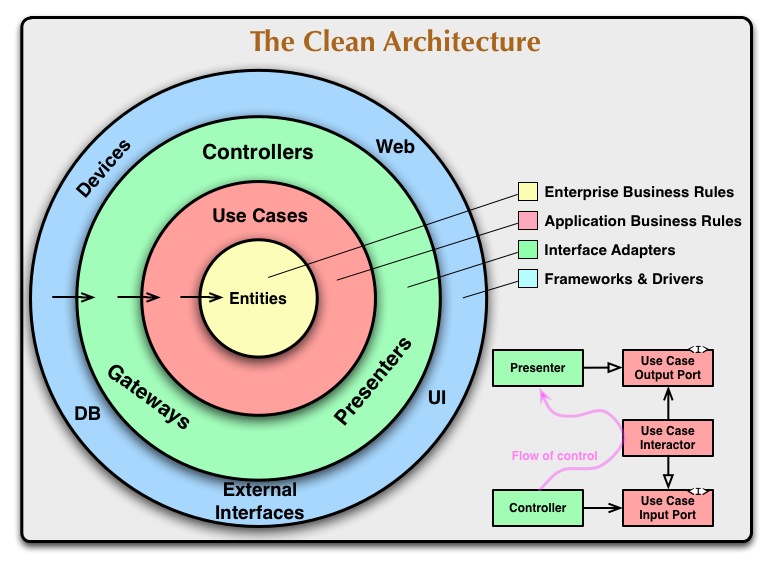
What is Clean Architecture? Clean Architecture, introduced by Robert C. Martin (Uncle Bob), is a software design philosophy that emphasizes:
Separation of Concerns : Each layer has a distinct responsibilityDependency Inversion : Dependencies point inward toward business logicTestability : Business logic can be tested without UI, database, or frameworksFramework Independence : Core logic isn’t tied to any specific framework
The Dependency Rule The fundamental principle of Clean Architecture is the Dependency Rule :
Source code dependencies must point only inward , toward higher-level policies. Nothing in an inner circle can know anything about an outer circle.
How SAPFIAI Implements This Domain Layer (Core) ↑ | depends on | Application Layer ↑ | depends on | Infrastructure Layer ↑ | depends on | Web Layer (Presentation)
Layer Responsibilities Domain Layer (Enterprise Business Rules) The Domain layer is the heart of the application, containing:
Entities : Core business objectsValue Objects : Immutable domain conceptsDomain Events : Business events that occurredDomain Exceptions : Business rule violations
Entity Example
Base Entity
Value Object
// src/Domain/Entities/Permission.cs namespace SAPFIAI . Domain . Entities ; public class Permission : BaseEntity { public string Name { get ; set ; } = string . Empty ; public string ? Description { get ; set ; } public string Module { get ; set ; } = string . Empty ; public bool IsActive { get ; set ; } = true ; public DateTime CreatedAt { get ; set ; } = DateTime . UtcNow ; // Navigation properties public ICollection < RolePermission > RolePermissions { get ; set ; } = new List < RolePermission >(); }
// src/Domain/Common/BaseEntity.cs namespace SAPFIAI . Domain . Common ; public abstract class BaseEntity { public int Id { get ; set ; } private readonly List < BaseEvent > _domainEvents = new (); [ NotMapped ] public IReadOnlyCollection < BaseEvent > DomainEvents => _domainEvents . AsReadOnly (); public void AddDomainEvent ( BaseEvent domainEvent ) { _domainEvents . Add ( domainEvent ); } public void ClearDomainEvents () { _domainEvents . Clear (); } }
// src/Domain/ValueObjects/Colour.cs namespace SAPFIAI . Domain . ValueObjects ; public class Colour : ValueObject { public string Code { get ; private set ; } public static Colour From ( string code ) { // Value object creation logic return new Colour { Code = code }; } protected override IEnumerable < object > GetEqualityComponents () { yield return Code ; } }
The Domain layer has zero dependencies on external packages. It’s pure C# code representing your business rules.
Application Layer (Application Business Rules) The Application layer orchestrates business workflows through:
Use Cases : Commands and Queries (CQRS)Interfaces : Abstract contracts for external servicesDTOs : Data Transfer Objects for layer communicationBehaviors : Cross-cutting concerns (validation, logging)Exceptions : Application-specific errors
Interface (Contract)
Command
Handler
Validator
// src/Application/Common/Interfaces/IApplicationDbContext.cs namespace SAPFIAI . Application . Common . Interfaces ; public interface IApplicationDbContext { DbSet < Permission > Permissions { get ; } DbSet < RolePermission > RolePermissions { get ; } DbSet < AuditLog > AuditLogs { get ; } Task < int > SaveChangesAsync ( CancellationToken cancellationToken ); }
The Application layer defines the interface, but the Infrastructure layer provides the implementation.
// src/Application/Permissions/Commands/CreatePermission/CreatePermissionCommand.cs namespace SAPFIAI . Application . Permissions . Commands . CreatePermission ; public record CreatePermissionCommand : IRequest < Result < int >> { public required string Name { get ; init ; } public string ? Description { get ; init ; } public required string Module { get ; init ; } }
// src/Application/Permissions/Commands/CreatePermission/CreatePermissionCommandHandler.cs public class CreatePermissionCommandHandler : IRequestHandler < CreatePermissionCommand , Result < int >> { private readonly IApplicationDbContext _context ; private readonly ILogger < CreatePermissionCommandHandler > _logger ; public CreatePermissionCommandHandler ( IApplicationDbContext context , ILogger < CreatePermissionCommandHandler > logger ) { _context = context ; _logger = logger ; } public async Task < Result < int >> Handle ( CreatePermissionCommand request , CancellationToken cancellationToken ) { _logger . LogInformation ( "Creating permission: {PermissionName}" , request . Name ); var exists = await _context . Permissions . AnyAsync ( p => p . Name == request . Name , cancellationToken ); if ( exists ) { return Result . Failure < int >( new Error ( "PermissionExists" , "El permiso ya existe" )); } var permission = new Permission { Name = request . Name , Description = request . Description , Module = request . Module , IsActive = true , CreatedAt = DateTime . UtcNow }; _context . Permissions . Add ( permission ); await _context . SaveChangesAsync ( cancellationToken ); return Result . Success ( permission . Id ); } }
// src/Application/Permissions/Commands/CreatePermission/CreatePermissionCommandValidator.cs public class CreatePermissionCommandValidator : AbstractValidator < CreatePermissionCommand > { public CreatePermissionCommandValidator () { RuleFor ( x => x . Name ) . NotEmpty (). WithMessage ( "El nombre del permiso es requerido" ) . MaximumLength ( 100 ) . Matches ( "^[a-z0-9._-]+$" ) . WithMessage ( "Use formato: modulo.accion (ej: users.create)" ); RuleFor ( x => x . Module ) . NotEmpty (). WithMessage ( "El módulo es requerido" ) . MaximumLength ( 50 ); RuleFor ( x => x . Description ) . MaximumLength ( 500 ) . When ( x => ! string . IsNullOrEmpty ( x . Description )); } }
Infrastructure Layer (Frameworks & Drivers) The Infrastructure layer provides concrete implementations:
DbContext : Entity Framework database accessRepositories : Data access patternsServices : External API integrations (email, SMS)File Storage : Cloud or local file systemsIdentity : Authentication and authorization
DbContext Implementation
Entity Configuration
Service Registration
// src/Infrastructure/Data/ApplicationDbContext.cs namespace SAPFIAI . Infrastructure . Data ; public class ApplicationDbContext : IdentityDbContext < ApplicationUser >, IApplicationDbContext { public ApplicationDbContext ( DbContextOptions < ApplicationDbContext > options ) : base ( options ) { } public DbSet < AuditLog > AuditLogs => Set < AuditLog >(); public DbSet < Permission > Permissions => Set < Permission >(); public DbSet < RolePermission > RolePermissions => Set < RolePermission >(); public DbSet < RefreshToken > RefreshTokens => Set < RefreshToken >(); protected override void OnModelCreating ( ModelBuilder builder ) { builder . ApplyConfigurationsFromAssembly ( Assembly . GetExecutingAssembly ()); base . OnModelCreating ( builder ); } }
ApplicationDbContext implements IApplicationDbContext from the Application layer.
// src/Infrastructure/Data/Configurations/PermissionConfiguration.cs public class PermissionConfiguration : IEntityTypeConfiguration < Permission > { public void Configure ( EntityTypeBuilder < Permission > builder ) { builder . Property ( p => p . Name ) . HasMaxLength ( 100 ) . IsRequired (); builder . HasIndex ( p => p . Name ) . IsUnique (); builder . Property ( p => p . Module ) . HasMaxLength ( 50 ) . IsRequired (); builder . Property ( p => p . Description ) . HasMaxLength ( 500 ); } }
// src/Infrastructure/DependencyInjection.cs public static class DependencyInjection { public static IServiceCollection AddInfrastructureServices ( this IServiceCollection services , IConfiguration configuration ) { // Database services . AddDbContext < ApplicationDbContext >( options => options . UseSqlServer ( configuration . GetConnectionString ( "DefaultConnection" ))); services . AddScoped < IApplicationDbContext >( provider => provider . GetRequiredService < ApplicationDbContext >()); // Identity services . AddIdentityCore < ApplicationUser >() . AddRoles < IdentityRole >() . AddEntityFrameworkStores < ApplicationDbContext >(); // Services services . AddScoped < IPermissionService , PermissionService >(); services . AddScoped < IRoleService , RoleService >(); services . AddScoped < IEmailService , BrevoEmailService >(); return services ; } }
Web Layer (Interface Adapters) The Web layer handles HTTP concerns:
Endpoints : API route definitionsMiddleware : Request/response pipelineFilters : Cross-cutting HTTP concernsDTOs : Request/Response modelsConfiguration : Dependency injection setup
Endpoint
Endpoint Registration
Program.cs
// src/Web/Endpoints/Permissions.cs (lines 65-68) private static async Task < IResult > GetPermissions ( IMediator mediator , [ FromQuery ] bool activeOnly = false ) { var permissions = await mediator . Send ( new GetPermissionsQuery { ActiveOnly = activeOnly }); return Results . Ok ( permissions ); }
// src/Web/Endpoints/Permissions.cs (lines 18-27) public override void Map ( WebApplication app ) { var group = app . MapGroup ( this ) . WithName ( "Permissions" ) . WithOpenApi () . RequireAuthorization ( "RequireAdministrator" ); group . MapGet ( "/" , GetPermissions ) . WithName ( "GetPermissions" ) . Produces < List < PermissionDto >>( StatusCodes . Status200OK ); // ... more endpoints }
// src/Web/Program.cs (simplified) var builder = WebApplication . CreateBuilder ( args ); // Register services from each layer builder . Services . AddApplicationServices (); // Application layer builder . Services . AddInfrastructureServices ( // Infrastructure layer builder . Configuration ); builder . Services . AddWebServices (); // Web layer var app = builder . Build (); // Configure HTTP pipeline app . UseHttpsRedirection (); app . UseAuthentication (); app . UseAuthorization (); app . MapEndpoints (); // Register all endpoints app . Run ();
Dependency Inversion in Action Let’s see how dependency inversion works:
Application defines interface
// src/Application/Common/Interfaces/IEmailService.cs public interface IEmailService { Task SendEmailAsync ( string to , string subject , string body ); }
Application uses interface
// Application handler depends on IEmailService public class RegisterCommandHandler { private readonly IEmailService _emailService ; public RegisterCommandHandler ( IEmailService emailService ) { _emailService = emailService ; } public async Task Handle (...) { await _emailService . SendEmailAsync ( .. .); } }
Infrastructure implements interface
// src/Infrastructure/Services/BrevoEmailService.cs public class BrevoEmailService : IEmailService { public async Task SendEmailAsync ( string to , string subject , string body ) { // Actual implementation using Brevo API } }
Infrastructure registers implementation
// src/Infrastructure/DependencyInjection.cs services . AddHttpClient < IEmailService , BrevoEmailService >();
The Application layer doesn’t know about Brevo. You could swap to SendGrid, AWS SES, or any other provider without changing application code!
Benefits Realized 1. Testability // Test the handler with a mock email service [ Test ] public async Task Handle_ValidRequest_SendsEmail () { var mockEmailService = new Mock < IEmailService >(); var handler = new RegisterCommandHandler ( mockEmailService . Object ); await handler . Handle ( new RegisterCommand { .. . }); mockEmailService . Verify ( x => x . SendEmailAsync ( It . IsAny < string >(), It . IsAny < string >(), It . IsAny < string >()), Times . Once ); }
2. Framework Independence The Domain and Application layers don’t depend on:
Entity Framework
ASP.NET Core
Any specific database
Any external library
You can swap these out without touching your business logic.
3. Parallel Development Teams can work on different layers simultaneously:
Frontend team uses the Application interfaces
Backend team implements Infrastructure
Domain experts work on business logic
4. Migration-Friendly
Migrate from SQL Server to PostgreSQL → Change Infrastructure only
Migrate from REST API to gRPC → Change Web layer only
Add GraphQL alongside REST → Add new Web endpoints
Common Pitfalls Don’t let the Domain depend on anything! ❌ Wrong: // Domain/Entities/User.cs using Microsoft . EntityFrameworkCore ; // BAD! public class User : BaseEntity { }
✅ Correct: // Domain/Entities/User.cs namespace SAPFIAI . Domain . Entities ; public class User : BaseEntity { }
Don’t bypass the Application layer ❌ Wrong: // Web calling Infrastructure directly public class PermissionsController { private readonly ApplicationDbContext _context ; // BAD! }
✅ Correct: // Web calling Application via MediatR public class Permissions { private static async Task < IResult > GetPermissions ( IMediator mediator ) // GOOD! { return await mediator . Send ( new GetPermissionsQuery ()); } }
Next Steps
Project Structure Explore the folder organization
CQRS Pattern Learn about Commands and Queries
Domain Entities Deep dive into Domain entities
Dependency Injection Service registration patterns