components/. Server Components have no directive at the top; Client Components begin with "use client".
Components that only read from static data files or the filesystem render as React Server Components by default, producing zero client-side JavaScript. Components that use browser APIs, React state, or
useEffect are opted into the client runtime with "use client".Hero
File:components/Hero.tsx · Server Component
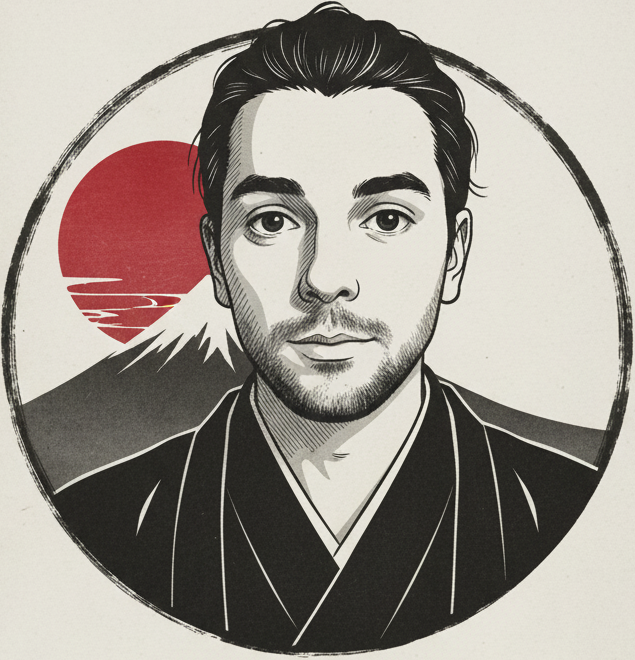
Renders the full-viewport landing section. Displays a profile photo inside a decorative Japanese frame image, the developer’s name and title in both Spanish and Japanese (ウェブ開発者), quick-info badges (location, experience, email), a short biography, and two CTA buttons that anchor-scroll to #projects and #contact.
Also renders a bouncing scroll indicator arrow at the bottom of the viewport and two decorative red circles (red-circle) positioned absolutely.
Props: none — all content is hardcoded in the component.
Notable details:
- Uses
next/imagewithpriorityon both the frame and profile images so they are preloaded. - The
pattern-bgCSS class applies the asanoha tile pattern at 3% opacity as an absolute overlay. - The Japanese motto
美は、シンプルさの中に。(“Beauty lies in simplicity”) is rendered with the.text-japaneseclass (Noto Serif JP).
Works
File:components/Works.tsx · Server Component
Renders a responsive card grid of all portfolio projects imported from data/projects.ts.
Props: none — data is imported directly.
Each card shows:
- A numbered badge (01, 02, …) in the top-left corner
- A hover-zoom project screenshot (
next/image) - GitHub and Demo links that fade in on hover
- The project title, Japanese subtitle, description, and technology tags
Project type):
- Images are statically imported at the top of
data/projects.ts, so Next.js generates correctwidth/heightmetadata automatically. - The
urokoscale pattern (pattern-bg-uroko) is used as the section background texture. - The grid is
md:grid-cols-2 lg:grid-cols-3.
Skills
File:components/Skills.tsx · Server Component
Renders a grid of skill category cards, each containing a Lucide icon, a title, a Japanese subtitle, and a bullet list of specific technologies.
Props: none — data is imported from data/skills.ts.
Data shape consumed (Skill type):
- The
iconfield is a Lucide icon component reference (not JSX). It is instantiated inside the.map()viaconst Icon = skill.icon; <Icon ... />. - Each card receives a staggered
animationDelayvia inline style (index * 100ms). - The wave pattern (
pattern-bg-waves) is the section texture. - The grid is
sm:grid-cols-2 lg:grid-cols-3.
Experience
File:components/Experience.tsx · Server Component
Renders the professional background section with a two-column layout: Education on the left, Work Experience on the right. Both columns are powered by the TimelineSection component.
Props: none — data is imported from data/experience.ts.
Rendering structure:
- A decorative vertical line and two animated dots are rendered absolutely on large screens to visually connect the two columns.
- The kumo cloud pattern (
pattern-bg-kumo) is the section texture. - Column layout switches from single to
lg:grid-cols-2at thelgbreakpoint.
TimelineSection
File:components/TimelineSection.tsx · Server Component
A reusable vertical timeline used by Experience. Renders a section header (icon + title + Japanese subtitle) and a list of timeline entry cards.
Props:
TimelineItem card renders:
- Entry title and optional Japanese label
- Date badge (
item.years) with aCalendaricon - Subtitle (
item.sub_title), e.g. institution or company name - Detail paragraph (
item.details) - A ghost index number in the bottom-right corner
variant color mapping:
variant | Border color | Text color |
|---|---|---|
"primary" | border-primary | text-primary |
"accent" | border-accent | text-accent |
- The left border of each card (
border-l-4) uses the variant color, creating the visual timeline track. - The
keyfor each item is${item.title}-${item.years}to handle entries with the same title at different times.
Navigation
File:components/Navigation.tsx · Server Component
The fixed top navigation bar. Renders a logo area (profile image + Japanese motto) and the right-side controls.
Props: none.
Rendering structure:
Navigationitself is a Server Component. The interactive pieces (NavLinks,AnimatedThemeToggler) are Client Components imported inside it — Next.js handles the boundary automatically.- The logo text swaps between the Japanese motto and its Spanish translation on hover using a CSS opacity/translate transition (no JavaScript).
NavLinks
File:components/NavLinks.tsx · "use client"
Renders the navigation link list for both desktop and mobile. Tracks the currently visible section and highlights the matching link with an accent-colored SVG diamond indicator.
Props: none.
Navigation items (hardcoded):
href | label |
|---|---|
#hero | HOME |
#projects | PROJECTS |
#skills | SKILLS |
#experience | EXPERIENCE |
#contact | CONTACT |
- Uses an
IntersectionObserver-style scroll listener (getBoundingClientRect) to track which section is attop <= 150px. - Smooth-scrolls via
element.scrollIntoView({ behavior: "smooth" })and updates the URL hash withhistory.pushStateon click. - On mobile, renders a hamburger toggle button that expands a vertical menu anchored to the bottom of the nav bar.
- The active indicator is an inline SVG diamond shape rendered from
currentColor(usestext-accent).
AIDrawer
File:components/AIDrawer.tsx · "use client"
A slide-in chat drawer that lets visitors ask questions about the portfolio owner. Powered by the Vercel AI SDK’s useChat hook, which streams responses from /api/chat.
Props:
| Name | Responsibility |
|---|---|
FloatingButton | Fixed bottom-right button that opens the drawer |
ChatHeader | Drawer title bar with bot icon and close button |
MessageItem | Renders a single chat bubble (user or assistant) |
ChatInput | Textarea + send/stop button at the bottom of the drawer |
ErrorMessage | Red alert bar shown when useChat returns an error |
Overlay | Semi-transparent backdrop; clicking it closes the drawer |
- Uses
TextStreamChatTransportfrom the AI SDK (v5 API) to connect to/api/chat. - The initial welcome message is injected as a pre-seeded
UIMessagearray (INITIAL_MESSAGES) — it is never sent to the server. formatMessageContent()fromlib/chat-utils.tsxpost-processes assistant text to turn URLs into clickable links and**text**into<strong>elements.Entersends the message;Shift+Enterinserts a newline.AbortControllercancellation is exposed via thestopfunction fromuseChat, wired to a stop button that appears while streaming.- Focus is set on the textarea 300 ms after the drawer opens.
AIDrawerLazy
File:components/AIDrawerLazy.tsx · "use client"
A thin lazy-loading wrapper around AIDrawer. Used in app/layout.tsx instead of AIDrawer directly to defer loading the chat bundle until the user first interacts with the floating button.
Props: none.
Behavior:
- Before the user clicks: renders a placeholder floating button (identical appearance to
AIDrawer’s ownFloatingButton). - On
mouseenter/focus: pre-fetches theAIDrawerchunk via a dynamicimport()call (warm-up without mounting). - On click: sets
loaded = true, which mounts<AIDrawer initialOpen />(with the drawer already open). AIDraweris loaded withdynamic(..., { ssr: false })to prevent server-side rendering of the chat UI.
Footer
File:components/Footer.tsx · Server Component
A simple page footer with a copyright line, three social icon links, and a decorative red gradient rule.
Props: none.
The social links are defined in a private socialLinks array local to this file (separate from the data/socials.ts file used by the AI context). Each entry has href, alt, and src fields pointing to PNG icons under public/images/footer/.
The
Footer component defines its own local social link data independently of data/socials.ts. The data/socials.ts file is used exclusively for the AI assistant context, while Footer manages its own icon assets in public/images/footer/.ThemeProvider
File:components/ThemeProvider.tsx · "use client"
A thin wrapper that re-exports next-themes’ ThemeProvider as a named Client Component export. This pattern is required because next-themes uses useContext internally and cannot be used directly in a Server Component.
Props: passes all props through to NextThemesProvider.
Used in app/layout.tsx:
attribute="class", the theme is applied by toggling the dark class on <html>, which activates the .dark CSS variable block in globals.css.
ThemeToggle
File:components/ThemeToggle.tsx · "use client"
A button that toggles between dark and light mode using the useTheme hook from next-themes.
Props: none.
Notable details:
- Renders a disabled placeholder on first render (before mount) to avoid a hydration mismatch —
resolvedThemeis only available client-side. - Shows a
Sunicon in dark mode and aMoonicon in light mode.
The actual toggle button in the navigation bar is rendered by
AnimatedThemeToggler from components/ui/animated-theme-toggler.tsx, not ThemeToggle directly. ThemeToggle is available as a simpler alternative.Shared/ProfileImage
File:components/Shared/ProfileImage.tsx · Server Component
A reusable circular profile photo component used in Navigation (small variant) and available for use elsewhere.
Props:
size | Container class | sizes hint |
|---|---|---|
"small" | w-12 h-12 border-2 | 48px |
"medium" | w-32 h-32 border-4 | 128px |
"large" | w-48 h-48 border-4 | 192px |
- Image source is hardcoded to
/images/yo.avif. - The border color defaults to the project’s primary red (
#B94A48) applied as an inline style, so it works independently of Tailwind’s color utilities.
Project Structure Overview
Directory tree, App Router setup, and the chat API route.
Data Layer
TypeScript interfaces and data file reference.