
Documentation Index

Fetch the complete documentation index at: https://mintlify.com/TrustifAI/trustifai/llms.txt

Use this file to discover all available pages before exploring further.

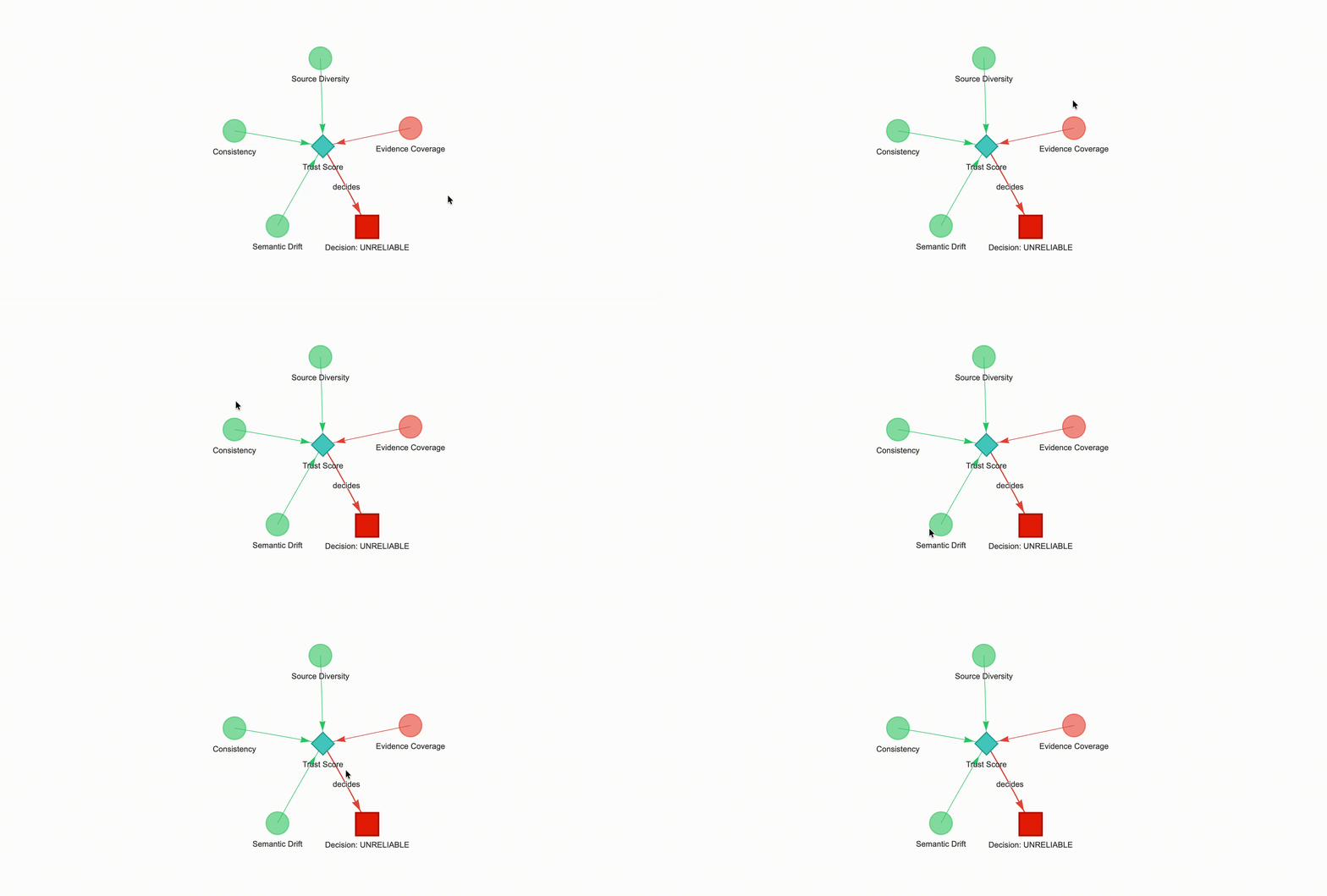
A Trust Score is only as useful as your ability to understand and explain it. TrustifAI’s Reasoning Graph makes the entire evaluation pipeline visible — it turns the abstract weighted aggregation into a directed acyclic graph (DAG) that shows which metrics fired, what each one found, and how the final decision was reached. You can render it as an interactive HTML visualization or export it as Mermaid syntax for embedding in documentation.

DAG structure

Every Reasoning Graph contains three tiers of nodes connected by directed edges:
[Metric nodes] ──► [Aggregation node] ──► [Decision node]
TierNode typeShapeWhat it represents
MetricmetricCircle (dot)One active metric with its score and label
AggregationaggregationDiamondThe weighted sum of all active metrics
DecisiondecisionSquareThe final RELIABLE / ACCEPTABLE / UNRELIABLE label
Only active metrics (those with a non-zero weight in your config) appear in the graph. Disabled or zero-weight metrics are silently excluded from both computation and visualization.

Color coding

Node and edge colors communicate trust level at a glance:
ColorThresholdMeaning
Green (#2ecc71)Score ≥ 0.85High trust
Orange (#f39c12)Score ≥ 0.60Medium trust
Red (#e74c3c)Score < 0.60Low trust
The thresholds used for coloring are pulled from each metric’s own config — for example, STRONG_GROUNDING and PARTIAL_GROUNDING for the Evidence Coverage node — so the colors reflect the same thresholds you configured for the labels.

Building the graph

Call build_reasoning_graph() on the result returned by get_trust_score(). The graph is a pure data structure (ReasoningGraph) — no rendering happens yet.
from trustifai import Trustifai, MetricContext
from langchain_core.documents import Document

context = MetricContext(
    query="What is the capital of India?",
    answer="The capital is New Delhi.",
    documents=[
        Document(
            page_content="New Delhi is the capital of India.",
            metadata={"source": "wiki.txt"}
        )
    ]
)

trust_engine = Trustifai(config_path="config_file.yaml")
result = trust_engine.get_trust_score(context)
graph  = trust_engine.build_reasoning_graph(result)

Visualizing the graph

Pass the ReasoningGraph to visualize() and choose a graph_type. TrustifAI supports two renderers:
# Saves an interactive physics-based graph to reasoning_graph.html
trust_engine.visualize(graph, graph_type="pyvis")

PyVis output

The PyVis renderer produces a self-contained HTML file (reasoning_graph.html by default) with a physics-based interactive layout. Metric nodes are arranged in a circle around the central aggregation diamond. You can drag nodes, zoom, and hover over any node to see its score, label, and diagnostic explanation in a tooltip. PyVis requires the optional pyvis package:
pip install pyvis
Serve reasoning_graph.html directly from your evaluation pipeline to give stakeholders a self-explanatory audit trail for every scored response, without requiring them to read code or JSON.

Mermaid output

The Mermaid renderer returns a fenced code block ready for embedding in GitHub, Notion, or any documentation site that renders Mermaid diagrams. Each node is styled with the same color coding as the PyVis graph. Example output:
```mermaid
flowchart TD
   evidence_coverage["<b>Evidence Coverage</b><br/>Score: 1.00<br/>Strong Grounding"]
   consistency["<b>Consistency</b><br/>Score: 0.88<br/>Stable Consistency"]
   semantic_drift["<b>Semantic Drift</b><br/>Score: 0.91<br/>Strong Alignment"]
   source_diversity["<b>Source Diversity</b><br/>Score: 0.80<br/>High Trust"]
   trust_aggregation{"<b>Trust Score</b><br/>Score: 0.92"}
   final_decision("Decision: RELIABLE")
   evidence_coverage --> trust_aggregation
   consistency --> trust_aggregation
   semantic_drift --> trust_aggregation
   source_diversity --> trust_aggregation
   trust_aggregation --> final_decision
   style evidence_coverage fill:#2ecc71,color:#000000
   style consistency fill:#2ecc71,color:#000000
   style semantic_drift fill:#2ecc71,color:#000000
   style source_diversity fill:#2ecc71,color:#000000
   style trust_aggregation fill:#2ecc71,color:#000000
   style final_decision fill:#2ecc71,color:#000000
```

Complete example

The following snippet shows the full evaluate-then-visualize workflow in both output formats:
from trustifai import Trustifai, MetricContext
from langchain_core.documents import Document

# 1. Define context
context = MetricContext(
    query="What is the capital of India?",
    answer="The capital is New Delhi.",
    documents=[
        Document(
            page_content="New Delhi is the capital of India.",
            metadata={"source": "wiki.txt"}
        )
    ]
)

# 2. Score and build graph
trust_engine = Trustifai(config_path="config_file.yaml")
result = trust_engine.get_trust_score(context)
graph  = trust_engine.build_reasoning_graph(result)

# 3a. Interactive HTML
trust_engine.visualize(graph, graph_type="pyvis")
# → Saves reasoning_graph.html

# 3b. Mermaid for documentation
mermaid = trust_engine.visualize(graph, graph_type="mermaid")
print(mermaid)

Graph data model

If you need to process the graph programmatically — for logging, serialization, or custom rendering — call graph.to_dict():
graph_dict = graph.to_dict()
# {
#   "trace_id": "a1b2c3d4-...",
#   "nodes": [
#     { "node_id": "evidence_coverage", "node_type": "metric", "score": 1.0, "label": "Strong Grounding", ... },
#     { "node_id": "trust_aggregation", "node_type": "aggregation", "score": 0.92, ... },
#     { "node_id": "final_decision",    "node_type": "decision",    "label": "RELIABLE", ... }
#   ],
#   "edges": [
#     { "source": "evidence_coverage", "target": "trust_aggregation", "relationship": "" },
#     { "source": "trust_aggregation", "target": "final_decision",    "relationship": "decides" }
#   ]
# }
Each graph is assigned a unique trace_id (UUID4) so you can correlate graphs with specific evaluation runs in logs or tracing systems.
The Reasoning Graph is built purely from the get_trust_score() result dict — it does not make any additional API calls. You can safely rebuild or re-render it as many times as needed from the same result object.

Build docs developers (and LLMs) love