Overview

This guide walks you through creating a complete tabbed admin interface for a polling application. You’ll learn how to use AdminTab, AdminChangeListTab, and TabbedModelAdmin to organize your admin interface.

Example Application

We’ll build an admin interface for a simple polling app with three models:
  • Poll: Contains a question
  • Choice: Multiple choice options for each poll
  • Answer: User responses to poll choices

Step-by-Step Guide

1

Define your models

First, create your Django models:
models.py
from django.db import models

class Poll(models.Model):
    question = models.CharField(max_length=200)

    def __str__(self):
        return self.question

class Choice(models.Model):
    poll = models.ForeignKey(Poll, on_delete=models.CASCADE)
    text = models.CharField(max_length=200)

    def __str__(self):
        return f"{self.poll} {self.text}"

class Answer(models.Model):
    timestamp = models.DateTimeField(auto_now=True, auto_created=True)
    choice = models.ForeignKey(Choice, on_delete=models.CASCADE)

    def __str__(self):
        return f"Answer: {self.choice}"
2

Import required classes

In your admin.py, import the necessary Django Admin Tabs classes:
admin.py
from django.contrib import admin
from django_admin_tabs import (
    AdminChangeListTab,
    AdminTab,
    TabbedModelAdmin,
)
from .models import Answer, Choice, Poll
3

Create an inline for related objects

Define a standard Django inline for the Choice model:
admin.py
class ChoiceInline(admin.StackedInline):
    model = Choice
    extra = 0
This inline will be displayed within the Poll tab.
4

Create an AdminTab for the main form

Create an AdminTab class to display the poll form:
admin.py
class PollAdminStep(AdminTab, admin.ModelAdmin):
    admin_tab_name = "Poll"
    fields = ("question",)
    inlines = (ChoiceInline,)
AdminTab inherits from admin.ModelAdmin, so you can use all standard Django admin options like fields, fieldsets, inlines, readonly_fields, etc.
5

Create an AdminChangeListTab for nested objects

Create an AdminChangeListTab to display answers related to the poll:
admin.py
@admin.register(Answer)
class AnswerAdmin(AdminChangeListTab, admin.ModelAdmin):
    admin_tab_name = "Answers"
    model = Answer
    fk_field = "choice__poll"
    parent_model = Poll
    date_hierarchy = "timestamp"
    list_display = (
        "timestamp",
        "choice",
    )
    list_filter = ("choice",)

    def get_form(self, request, obj=None, **kwargs):
        # Use self.parent_object to access the main admin instance
        form = super().get_form(request, obj, **kwargs)
        form.base_fields['choice'].queryset = self.parent_object.choice_set.all()
        return form
The fk_field supports Django ORM path syntax (e.g., "choice__poll"), allowing you to filter through multiple relationships.
Key attributes explained:
  • admin_tab_name: The display name for the tab
  • model: The model this changelist displays
  • fk_field: The relationship path to filter objects by the parent
  • parent_model: The model of the parent object (Poll)
  • parent_object: Available at runtime to access the current parent instance
6

Create the TabbedModelAdmin

Finally, create the main admin class that ties everything together:
admin.py
@admin.register(Poll)
class PollAdmin(TabbedModelAdmin, admin.ModelAdmin):
    admin_tabs = [
        PollAdminStep,
        AnswerAdmin,
    ]
The admin_tabs list defines which tabs appear and in what order.
7

Run migrations and test

Apply migrations and start your development server:
python manage.py makemigrations
python manage.py migrate
python manage.py runserver
Navigate to /admin/ and create a new Poll. You’ll see:
  1. Poll tab: Contains the question field and choice inlines
  2. Answers tab: Shows a filtered changelist of all answers for this poll

Complete Example

Here’s the complete admin.py file:
admin.py
from django.contrib import admin

from django_admin_tabs import (
    AdminChangeListTab,
    AdminTab,
    TabbedModelAdmin,
)
from .models import Answer, Choice, Poll


class ChoiceInline(admin.StackedInline):
    model = Choice
    extra = 0


class PollAdminStep(AdminTab, admin.ModelAdmin):
    admin_tab_name = "Poll"
    fields = ("question",)
    inlines = (ChoiceInline,)


@admin.register(Answer)
class AnswerAdmin(AdminChangeListTab, admin.ModelAdmin):
    admin_tab_name = "Answers"
    model = Answer
    fk_field = "choice__poll"
    parent_model = Poll
    date_hierarchy = "timestamp"
    list_display = (
        "timestamp",
        "choice",
    )
    list_filter = ("choice",)

    def get_form(self, request, obj=None, **kwargs):
        form = super().get_form(request, obj, **kwargs)
        form.base_fields["choice"].queryset = self.parent_object.choice_set.all()
        return form


@admin.register(Poll)
class PollAdmin(TabbedModelAdmin, admin.ModelAdmin):
    """The admin class that will render the change form with tabs.

    All configuration for changelist are still valid.
    """

    admin_tabs = [
        PollAdminStep,
        AnswerAdmin,
    ]

Visual Result

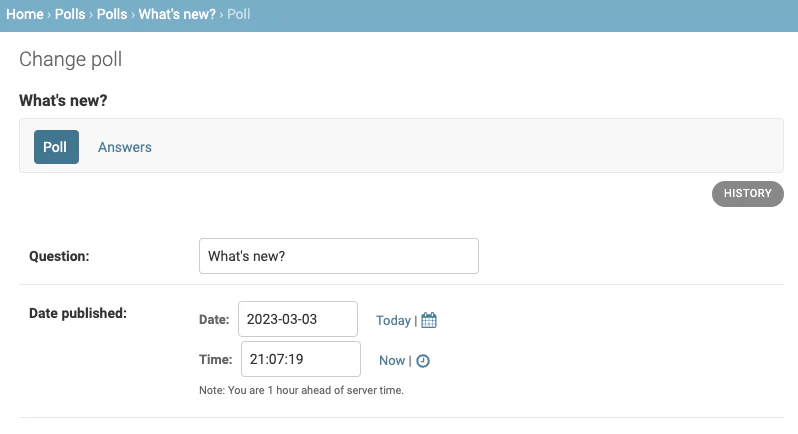
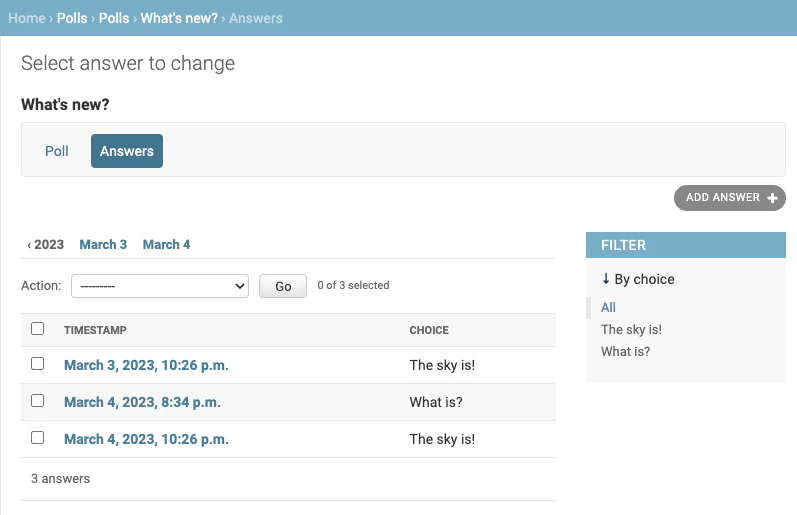
When you edit a Poll in the admin, you’ll see a tabbed interface:

AdminTab Example

Admin tab showing poll form with choice inlines The first tab displays the poll question field with inline choices.

AdminChangeListTab Example

Admin changelist tab showing filtered answers The second tab displays a filtered changelist showing only answers related to this specific poll.

Key Concepts

Independent Loading

Each tab loads and saves independently at its own URL. Changes in one tab don’t affect others until saved.

Filtered Changelists

AdminChangeListTab automatically filters the queryset to show only objects related to the parent instance.

Standard Admin Features

Use all Django admin features: fieldsets, inlines, list_display, list_filter, search_fields, and more.

Access Parent Object

Within AdminChangeListTab, use self.parent_object to access the parent instance in methods like get_form() or get_queryset().

Known Limitations

The delete button does not work for nested changelists and is therefore hidden. You can still delete objects using the changelist action.

Next Steps

AdminTab Concepts

Learn more about AdminTab and how to customize tabs

AdminChangeListTab Concepts

Dive deeper into nested changelists and filtering

API Reference

Explore the complete API reference for all classes

Examples

See more real-world examples and use cases

Build docs developers (and LLMs) love