ChemAgent is built on a sophisticated multi-layered architecture that combines large language models, specialized chemistry models, and validation tools to handle complex chemistry queries.Documentation Index
Fetch the complete documentation index at: https://mintlify.com/pranavkrishnasuresh/chemAgent/llms.txt
Use this file to discover all available pages before exploring further.
System Overview
The system follows a plan-and-execute pattern using LangGraph, orchestrating three key technologies:GPT-4o
Orchestrates planning, execution, and replanning
LlaSMol
Specialized chemistry model for 14 task types
RDKit
Validates SMILES structures and detects errors
Architecture Diagram
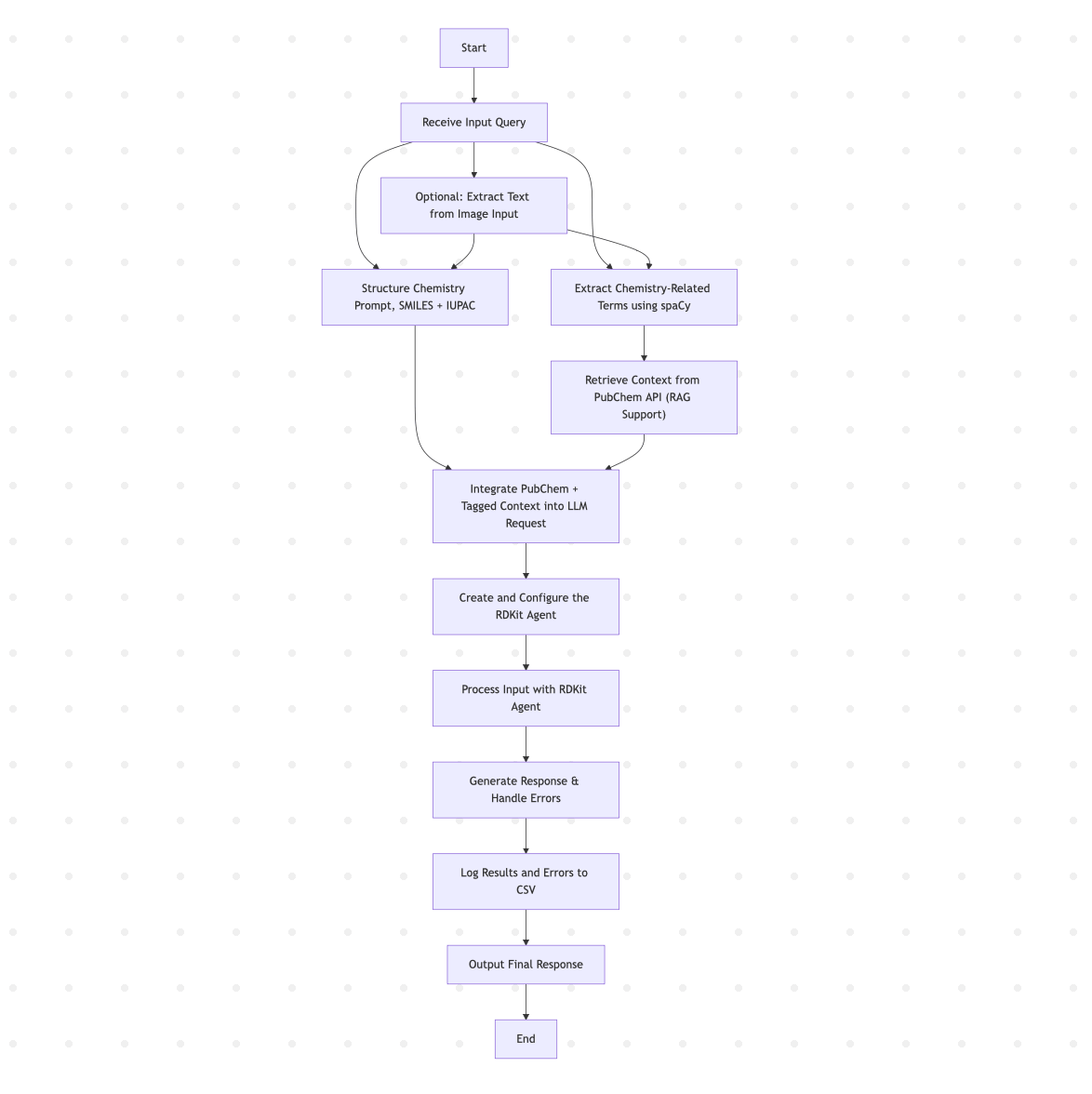
Core Components
1. LangGraph Plan-Execute Agent
ChemAgent uses LangGraph’screate_react_agent with a state-driven workflow:
- Planner: Creates step-by-step execution plans
- Agent/Executor: Executes individual steps using available tools
- Replanner: Evaluates results and adapts the plan
2. Three Essential Tools
The agent has access to exactly three tools that must be called in sequence:Tool 1: structure_chem_prompt
Purpose: Tags and structures chemical information in the query"What is aspirin's formula?"→"What is the molecular formula of <IUPAC> aspirin </IUPAC>?"- Adds
<SMILES>and<IUPAC>tags where appropriate
Tool 2: answer_chemistry_query
Purpose: Uses LlaSMol to answer chemistry-specific queries- Name conversions (IUPAC ↔ SMILES, SMILES ↔ Formula)
- Property predictions (Solubility, LIPO, BBBP, Clintox, HIV, SIDER)
- Molecule captioning and generation
- Forward synthesis and retrosynthesis
Tool 3: validate_smiles_rdkit
Purpose: Validates SMILES outputs using RDKit with detailed error reporting- Unclosed rings
- Invalid characters
- Invalid parentheses
- Semantic chemistry issues
3. PubChem RAG Integration (Optional)
When enabled with--use_rag, the system augments queries with contextual information from PubChem:
- Term Extraction: Identifies chemistry-related nouns and proper nouns
- PubChem Query: Fetches compound data via REST API
- Context Augmentation: Adds retrieved information to the agent’s context
4. State Management
The agent maintains state using a TypedDict structure:START→planner→agent→replan→agent→ … →END- Maximum recursion limit: 50 iterations
Model Integration
GPT-4o: The Orchestrator
Responsibilities:- Creates execution plans (planner node)
- Decides tool calls and parameters (executor node)
- Evaluates results and adapts strategy (replanner node)
- Optionally extracts chemistry text from images
LlaSMol: Chemistry Expert
Model variants (all 7B parameters):osunlp/LlaSMol-Mistral-7B(recommended)osunlp/LlaSMol-Llama2-7Bosunlp/LlaSMol-CodeLlama-7Bosunlp/LlaSMol-Galactica-6.7B
LlaSMol requires GPU with sufficient VRAM. Set
LOW_VRAM=True in config.py to disable it for CPU-only environments.RDKit: Structure Validator
RDKit provides two validation layers:- Syntax Validation: Detects malformed SMILES strings
- Semantic Validation: Uses
DetectChemistryProblems()to find chemistry issues
Data Flow
A typical query flows through the system as follows:Configuration Options
Environment Variables
Runtime Configuration
Agent Parameters
Performance Characteristics
Latency
Latency
- Without RAG: 5-15 seconds per query
- With RAG: 10-25 seconds per query
- Image extraction: +3-5 seconds
Resource Requirements
Resource Requirements
- GPU Memory: 8GB+ for LlaSMol models
- CPU: 4+ cores recommended
- RAM: 16GB+ for optimal performance
Accuracy
Accuracy
- SMILES validation: 99%+ with RDKit
- Name conversions: ~85% accuracy on SMolInstruct
- Property predictions: Task-dependent (60-90%)
Error Handling
The system includes multiple error handling layers:- GraphRecursionError: Catches infinite loops when recursion limit is reached
- VRAM Check: Prevents model loading on low-memory systems
- Validation Errors: Detailed feedback via validity vectors
- Tool Errors: Graceful degradation with error messages
Next Steps
Agent Workflow
Explore the plan-execute-replan cycle
LlaSMol Model
Learn about the chemistry model