Documentation Index

Fetch the complete documentation index at: https://mintlify.com/reserve-protocol/reserve-index-dtf/llms.txt

Use this file to discover all available pages before exploring further.

Overview

Reserve Folio uses Dutch auctions to rebalance portfolio holdings. Each auction runs on all surplus/deficit token pairs simultaneously, with prices decaying exponentially from optimistic to pessimistic estimates.

Auction Lifecycle

Auctions progress through several states:
UNINITIALIZED → PENDING → WARMUP → OPEN → CLOSED
1

Uninitialized

Auction hasn’t been created yet
  • startTime == 0
  • endTime == 0
2

Pending

Auction created but not yet started
  • block.timestamp < startTime
3

Warmup

30-second warmup period to ensure fair competition
  • block.timestamp >= startTime
  • block.timestamp < startTime + 30
  • No bidding allowed yet
Warmup is bypassed for atomic swaps when start and end prices are equal
4

Open

Active bidding period
  • block.timestamp >= startTime + 30
  • block.timestamp <= endTime
  • Anyone can bid
5

Closed

Auction has ended
  • block.timestamp > endTime

Opening Auctions

Auctions can be opened in two ways:

Restricted Opening (by AUCTION_LAUNCHER)

During the restricted period, only the AUCTION_LAUNCHER can open auctions:
/// @param rebalanceNonce The nonce of the target rebalance
/// @param tokens Subset of tokens from the rebalance to include
/// @param newWeights D27{tok/BU} New basket weight ranges
/// @param newPrices D27{UoA/tok} New price ranges (must obey PriceControl)
/// @param newLimits D18{BU/share} New BU limits
/// @param auctionLength {s} Desired auction length
function openAuction(
    uint256 rebalanceNonce,
    address[] calldata tokens,
    WeightRange[] calldata newWeights,
    PriceRange[] calldata newPrices,
    RebalanceLimits calldata newLimits,
    uint256 auctionLength
) external onlyRole(AUCTION_LAUNCHER) returns (uint256 auctionId)

Unrestricted Opening

After the restricted period, anyone can open auctions using spot values:
/// Open auction on all tokens in rebalance with spot values and initial prices
function openAuctionUnrestricted(
    uint256 rebalanceNonce
) external returns (uint256 auctionId)
Unrestricted auctions use spot values for both limits and weights, with initial price ranges.

Price Curves

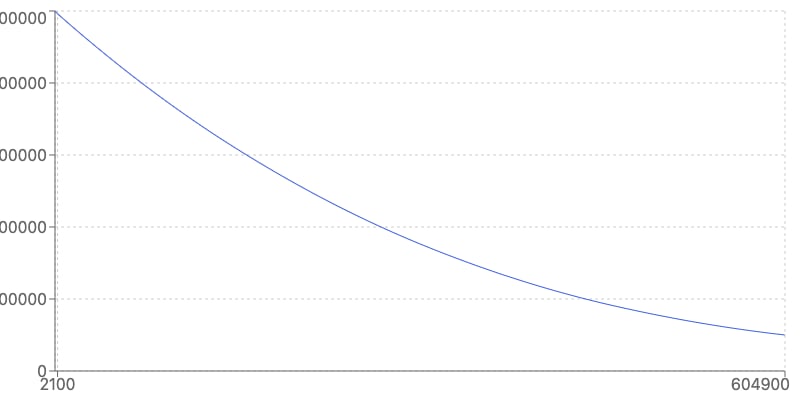
Auction prices decay exponentially over time between start and end prices.

How Prices are Calculated

// For a token pair (sell/buy)
startPrice = (sellToken.low * buyToken.high) / 1e27  // Most optimistic
endPrice = (sellToken.high * buyToken.low) / 1e27    // Most pessimistic

// Price at time t decays exponentially
function priceAt(uint256 t) returns (uint256) {
    if (t <= startTime + WARMUP) return type(uint256).max; // No bidding
    if (t >= endTime) return endPrice;
    
    // Exponential decay between startPrice and endPrice
    uint256 progress = (t - startTime - WARMUP) / (endTime - startTime - WARMUP);
    return startPrice * (endPrice / startPrice) ** progress;
}

Price Curve Visualization

Auction Price Curve
The first block may not have exactly startPrice if it doesn’t occur on the start timestamp. Similarly for endPrice and the final block.

Lot Sizing

Auction lot sizes are determined by surplus and deficit calculations relative to target basket limits and weights.

Surplus and Deficit

  • Surplus: Token balance exceeds high weight × high BU limit
  • Deficit: Token balance is below low weight × low BU limit

How Lot Size Changes

The sellAmount can increase or decrease over time:

Increasing Lot Size

When surplus of sell token is the limiting factorAs the auction progresses and some tokens are sold, the surplus decreases relative to progressively narrowing limits, allowing larger lots.

Decreasing Lot Size

When deficit of buy token is the limiting factorAs buy tokens are acquired, the deficit shrinks relative to progressively narrowing limits, requiring smaller lots.

Max Auction Size

Governance can set a maximum auction size per token:
struct TokenRebalanceParams {
    address token;
    WeightRange weight;
    PriceRange price;
    uint256 maxAuctionSize; // {tok} Max amount to sell in any single auction
    bool inRebalance;
}
This prevents overly large single auctions that could face excessive slippage.

Bidding on Auctions

Anyone can bid on an ongoing auction during the open period.

Getting Bid Information

Query current auction prices and lot sizes:
/// @param auctionId The auction ID
/// @param sellToken The token being sold by the Folio
/// @param buyToken The token being bought by the Folio
/// @param maxSellAmount {sellTok} Max amount bidder wants to buy
/// @return sellAmount {sellTok} Amount of sell token available
/// @return bidAmount {buyTok} Amount of buy token required
/// @return price D27{buyTok/sellTok} Current price
function getBid(
    uint256 auctionId,
    IERC20 sellToken,
    IERC20 buyToken,
    uint256 maxSellAmount
) external view returns (
    uint256 sellAmount, 
    uint256 bidAmount, 
    uint256 price
)

Submitting a Bid

Bid using allowances or callbacks:
/// @param auctionId The auction ID
/// @param sellToken Token the bidder receives from Folio
/// @param buyToken Token the bidder provides to Folio
/// @param sellAmount {sellTok} Amount of sell token to buy
/// @param maxBuyAmount {buyTok} Maximum amount bidder will pay
/// @param withCallback If true, uses callback for token transfer
/// @param data Arbitrary data passed to callback
/// @return boughtAmt {buyTok} Actual amount paid
function bid(
    uint256 auctionId,
    IERC20 sellToken,
    IERC20 buyToken,
    uint256 sellAmount,
    uint256 maxBuyAmount,
    bool withCallback,
    bytes calldata data
) external returns (uint256 boughtAmt)
Bids must be enabled for the rebalance. Check rebalance.bidsEnabled before attempting to bid.
// Get current bid info
(uint256 sellAmount, uint256 bidAmount, uint256 price) = folio.getBid(
    auctionId,
    sellToken,
    buyToken,
    1000e18  // max sell amount I want
);

// Approve buy tokens
buyToken.approve(address(folio), bidAmount);

// Submit bid
folio.bid(
    auctionId,
    sellToken,
    buyToken,
    sellAmount,
    bidAmount * 101 / 100,  // 1% slippage tolerance
    false,                   // no callback
    ""                       // no data
);

Trusted Fillers

As an alternative to direct bidding, trusted fillers enable asynchronous swaps.

Creating a Trusted Fill

/// @param auctionId The auction ID
/// @param sellToken Token Folio is selling
/// @param buyToken Token Folio is buying
/// @param targetFiller Address of the trusted filler implementation
/// @param deploymentSalt Salt for deterministic deployment
function createTrustedFill(
    uint256 auctionId,
    IERC20 sellToken,
    IERC20 buyToken,
    address targetFiller,
    bytes32 deploymentSalt
) external returns (IBaseTrustedFiller filler)
Trusted fillers must be enabled via trustedFillerEnabled and a valid registry must be set.

Trusted Filler Flow

1

Create Fill

Caller creates a trusted fill contract for the auction
2

Approve Tokens

Folio approves sell tokens to the trusted filler
3

Execute Swap

Trusted filler executes swap asynchronously (within same block)
4

Close Fill

Folio reclaims all token balances from the filler

Closing Auctions

Privileged roles can close auctions early:
/// Close an auction at any point in its lifecycle
/// Callable by: DEFAULT_ADMIN_ROLE, REBALANCE_MANAGER, or AUCTION_LAUNCHER
function closeAuction(uint256 auctionId) external
Closing an auction before startTime would break the invariant that endTime > startTime, so closing very early auctions will not revert but may have unexpected behavior.

Multiple Auctions per Rebalance

A single rebalance can have many auctions, but only one runs at a time.

Sequential Auction Strategy

// Auction 1: Wide ranges for price discovery
openAuction(tokens, wideWeights, widePrices, wideLimits, 3600);
// ... wait for auction to complete or close it

// Auction 2: Narrower ranges based on results
openAuction(tokens, narrowWeights, narrowPrices, narrowLimits, 1800);
// ... repeat as needed

// Final auction: Tight ranges to complete rebalance
openAuction(tokens, finalWeights, finalPrices, finalLimits, 1800);
The AUCTION_LAUNCHER can overwrite an ongoing auction, but unpermissioned callers must wait for the current auction to close.

Price Control Modes

The level of price control granted to AUCTION_LAUNCHER affects auction behavior:
No Price ControlAUCTION_LAUNCHER cannot modify prices from initial ranges.
  • Auction length must be maxAuctionLength
  • Prices fixed to governance-set ranges
  • Most decentralized option
Higher price control modes grant more power to the AUCTION_LAUNCHER. Use ATOMIC_SWAP only with highly trusted operators.

Auction Best Practices

  • Progressively narrow BU limits to responsibly DCA into new basket
  • End rebalance when prices move outside initially-provided ranges
  • If weightControl=true: Progressively narrow weight ranges to maintain intent
  • If priceControl=PARTIAL: Provide narrowed price ranges that include current clearing price
  • If priceControl=ATOMIC_SWAP: Fill atomically and end rebalance immediately after
  • Monitor price decay to find optimal entry point
  • Account for gas costs in profitability calculations
  • Use maxBuyAmount to protect against slippage
  • Consider competing bidders and MEV searchers
  • For large bids, consider multiple smaller bids over time
  • Set price ranges conservative enough to avoid value leakage
  • Configure auction length appropriate for expected volatility
  • Set maxAuctionSize to prevent excessive single-auction slippage
  • Monitor AUCTION_LAUNCHER behavior and revoke if malicious
  • Use lower price control modes when possible

Build docs developers (and LLMs) love