
Documentation Index

Fetch the complete documentation index at: https://mintlify.com/rhinestonewtf/warp-router/llms.txt

Use this file to discover all available pages before exploring further.

Quick Start Guide

This guide will help you integrate Warp Router into your solver or relayer in minutes. By the end, you’ll understand how to execute fill and claim operations, manage solver contexts, and optimize for gas efficiency.

Prerequisites

Before you begin, ensure you have:
Solidity ^0.8.28 development environment
Basic understanding of delegatecall patterns
Familiarity with either TheCompact or Permit2 protocols

Installation

1

Install dependencies

Add Warp Router to your project dependencies:
forge install rhinestonewtf/warp-router
2

Import the Router interface

Import the Router interface in your contract:
import { IRouter } from "warp-router/src/interfaces/IRouter.sol";
3

Connect to the Router

Initialize the Router in your contract:
contract MySolver {
    IRouter public immutable router;
    
    constructor(address _router) {
        router = IRouter(_router);
    }
}

Understanding Solver Context

The solver context is a critical component that allows you to pass settlement-specific data to adapters. Each adapter defines its own context format.

Solver Context Format

When the Router calls an adapter, it appends the solver context using:
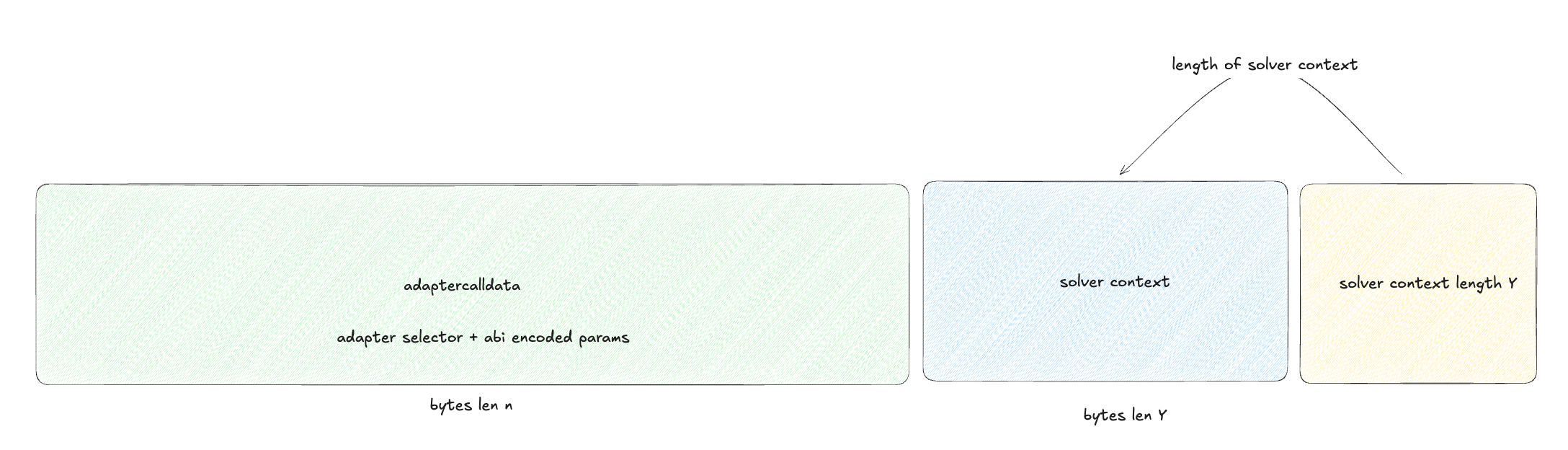
abi.encodePacked(adapterCalldata, relayerContext, uint256(relayerContext.length))
The resulting calldata structure looks like this: Solver context structure

Example: SameChainAdapter Context

The SameChainAdapter expects the simplest possible context - just the recipient address for input tokens:
src/arbiters/samechain/SameChainAdapter.sol
function _tokenInRecipient() internal pure returns (address tokenInRecipient) {
    (uint256 relayerContextLength, bytes calldata relayerContext) = _loadRelayerContext();
    require(relayerContextLength == 20, InvalidRelayerContext());
    // The first 20 bytes are the tokenIn recipient address
    return address(bytes20(relayerContext[:20]));
}
For solvers integrating with SameChainAdapter:
// Prepare solver context - just the recipient address
address myRecipientAddress = 0x123...; // Where you want input tokens sent
bytes memory relayerContext = abi.encodePacked(myRecipientAddress);

// Call the router with this context
router.routeFill(relayerContext, adapterCalldata);
Always check the adapter’s documentation to understand its expected context format. Incorrect context encoding will cause transactions to revert.

Executing Fill Operations

Fill operations are the core of settlement execution. Here’s how to execute them:

Standard Fill Route

1

Prepare adapter calldata

Encode your fill operation with the 4-byte function selector:
bytes memory adapterCalldata = abi.encodeWithSelector(
    ISameChainAdapter.samechain_compact_handleFill.selector,
    fillData  // Your fill parameters
);
2

Prepare solver context

Create your solver context with settlement-specific data:
// For SameChainAdapter: just the recipient address
address tokenInRecipient = msg.sender;
bytes memory relayerContext = abi.encodePacked(tokenInRecipient);
3

Execute the fill

Call the router to execute the fill:
router.routeFill(relayerContext, adapterCalldata);

Complete Fill Example

contract MySolver {
    IRouter public immutable router;
    
    function executeFill(
        Types.Order calldata order,
        Types.Signatures calldata signatures,
        bytes32[] calldata otherElements,
        bytes calldata allocatorData
    ) external {
        // 1. Prepare fill data
        ISameChainAdapter.FillDataCompact memory fillData = 
            ISameChainAdapter.FillDataCompact({
                order: order,
                userSigs: signatures,
                otherElements: otherElements,
                allocatorData: allocatorData
            });
        
        // 2. Encode adapter calldata
        bytes memory adapterCalldata = abi.encodeWithSelector(
            ISameChainAdapter.samechain_compact_handleFill.selector,
            fillData
        );
        
        // 3. Prepare solver context
        bytes memory relayerContext = abi.encodePacked(msg.sender);
        
        // 4. Execute fill
        router.routeFill(relayerContext, adapterCalldata);
    }
}
Fill operations require atomic signatures from the Router’s designated atomic signer. Ensure you have proper authorization before executing fills.

Executing Batch Fills (Optimized)

For gas-optimized batch operations, use the optimized_routeFill921336808 function:
1

Prepare multiple adapter calldatas

Create an array of adapter calldatas for your batch:
bytes[] memory adapterCalldatas = new bytes[](orderCount);
for (uint i = 0; i < orderCount; i++) {
    adapterCalldatas[i] = abi.encodeWithSelector(
        ISameChainAdapter.samechain_compact_handleFill.selector,
        fillDataArray[i]
    );
}
2

Encode and hash the batch

Encode the array and compute its hash:
bytes memory encoded = abi.encode(adapterCalldatas);
bytes32 hash = keccak256(encoded);
3

Get atomic signature

Obtain a signature from the atomic signer:
// Off-chain: sign the hash with the atomic signer's private key
bytes memory atomicSig = getAtomicSignature(hash);
4

Prepare solver contexts

Create context for each operation:
bytes[] memory relayerContexts = new bytes[](orderCount);
for (uint i = 0; i < orderCount; i++) {
    relayerContexts[i] = abi.encodePacked(recipientAddresses[i]);
}
5

Execute optimized batch

Call the optimized fill function:
router.optimized_routeFill921336808(
    relayerContexts,
    encoded,
    atomicSig
);
The optimized batch function provides significant gas savings through adapter caching and reduced calldata overhead. Use it for all multi-operation batches.

Executing Claim Operations

Claim operations unlock user resources from protocols. Unlike fills, they don’t require atomic signatures:

Single Claim

function executeClaim(
    Types.Order calldata order,
    Types.Signatures calldata signatures
) external {
    // Prepare claim calldata
    bytes memory claimCalldata = abi.encodeWithSelector(
        ISameChainAdapter.samechain_compact_handleClaim.selector,
        order,
        signatures
    );
    
    // Prepare context (if needed by adapter)
    bytes memory relayerContext = abi.encodePacked(msg.sender);
    
    // Execute claim
    router.routeClaim(relayerContext, claimCalldata);
}

Batch Claims

function executeBatchClaims(
    Types.Order[] calldata orders,
    Types.Signatures[] calldata signatures
) external {
    uint256 claimCount = orders.length;
    bytes[] memory claimCalldatas = new bytes[](claimCount);
    bytes[] memory relayerContexts = new bytes[](claimCount);
    
    for (uint i = 0; i < claimCount; i++) {
        claimCalldatas[i] = abi.encodeWithSelector(
            ISameChainAdapter.samechain_compact_handleClaim.selector,
            orders[i],
            signatures[i]
        );
        relayerContexts[i] = abi.encodePacked(msg.sender);
    }
    
    router.routeClaim(relayerContexts, claimCalldatas);
}
Claim operations rely on protocol-level authorization (TheCompact or Permit2 signatures) rather than atomic Router signatures.

Gas Optimization Tips

Batch Similar Operations

Group operations using the same adapter to leverage caching. Each cache hit saves approximately 2,100 gas.

Use Optimized Routes

The optimized_routeFill921336808 function provides significant gas savings through efficient encoding and caching.

Special Selectors

Use built-in selectors like singleCall and multiCall when possible to avoid adapter overhead (saves 2,600+ gas).

Minimize Context Size

Keep solver context as small as possible to reduce calldata costs, especially for batch operations.

Working with Same-Chain Settlements

Same-chain settlements follow a specific 3-step pattern:
1

Pre-funding

Solver pre-funds the recipient with output tokens before claiming input tokens:
src/arbiters/samechain/SameChainAdapter.sol
function samechain_compact_handleFill(FillDataCompact calldata fillData) 
    external payable onlyViaRouter returns (bytes4) 
{
    // Extract the solver's recipient address for input tokens
    address tokenInRecipient = _tokenInRecipient();
    
    // Pre-fund the user with output tokens
    _prefundRecipient(msg.sender, fillData.order.recipient, fillData.order.tokenOut);
    
    // ...
}
Pre-funding prevents order manipulation attacks where malicious actors could front-run settlements.
2

Resource unlock

Arbiter validates signatures and unlocks user’s input resources:
SameChainArbiter(ARBITER).handleCompact_NotarizedChain({
    order: fillData.order,
    sigs: fillData.userSigs,
    otherElements: fillData.otherElements,
    elementOffset: 0,
    notarizedChainId: block.chainid,
    allocatorData: fillData.allocatorData,
    relayer: tokenInRecipient  // Solver receives input tokens here
});
3

Completion

The arbiter transfers input tokens to the solver’s designated recipient, completing the atomic swap.

Security Considerations

Always validate signatures before executing operations. The Router’s atomic signature system is your primary security mechanism.

For Solvers

Fill operations require valid atomic signatures from the Router’s designated atomic signer. Never attempt to bypass signature validation.
Ensure your solver context matches the adapter’s expected format. Incorrect encoding will cause reverts and wasted gas.
All operations in a batch succeed or revert together. Design your batches carefully to avoid partial execution scenarios.
Account for pre-claim operation gas stipends when estimating total gas costs. Pre-claim operations receive dedicated gas allocations.

Common Patterns

Pattern 1: Simple Token Swap

// Execute a simple same-chain token swap
function executeSwap(
    Types.Order calldata order,
    Types.Signatures calldata sigs
) external {
    bytes memory fillCalldata = abi.encodeWithSelector(
        ISameChainAdapter.samechain_compact_handleFill.selector,
        ISameChainAdapter.FillDataCompact({
            order: order,
            userSigs: sigs,
            otherElements: new bytes32[](0),
            allocatorData: ""
        })
    );
    
    router.routeFill(
        abi.encodePacked(msg.sender),
        fillCalldata
    );
}

Pattern 2: Batch Operations with Same Adapter

// Maximize gas efficiency by batching operations using the same adapter
function executeBatchSwaps(
    Types.Order[] calldata orders,
    Types.Signatures[] calldata sigs,
    bytes memory atomicSig
) external {
    bytes[] memory calldatas = new bytes[](orders.length);
    bytes[] memory contexts = new bytes[](orders.length);
    
    for (uint i = 0; i < orders.length; i++) {
        calldatas[i] = abi.encodeWithSelector(
            ISameChainAdapter.samechain_compact_handleFill.selector,
            ISameChainAdapter.FillDataCompact({
                order: orders[i],
                userSigs: sigs[i],
                otherElements: new bytes32[](0),
                allocatorData: ""
            })
        );
        contexts[i] = abi.encodePacked(msg.sender);
    }
    
    router.optimized_routeFill921336808(
        contexts,
        abi.encode(calldatas),
        atomicSig
    );
}

Next Steps

Architecture Guide

Dive deep into the Router, Adapter, and Arbiter layers

API Reference

Explore the complete API documentation

Advanced Patterns

Learn advanced integration patterns and optimizations

Protocol Adapters

Explore available protocol adapters and their capabilities

Build docs developers (and LLMs) love