The UK Travel Recommendation app is organised into four distinct screen groups that a user encounters in order: the auth screens for account creation and sign-in, a three-step onboarding flow that tailors the recommendation engine to their interests, the main discovery and liked-attractions experience, and a settings area for updating ongoing preferences. Each group maps to a specific navigator in the rootDocumentation Index
Fetch the complete documentation index at: https://mintlify.com/viet2811/uk-travel-recommendation/llms.txt
Use this file to discover all available pages before exploring further.
NativeStackNavigator, ensuring clean transition animations and type-safe route parameters throughout.
Route Parameter Reference
All screen names and their associated parameters are declared in a single type intypes/navigation.tsx. This is the canonical reference for any navigation.navigate() call in the codebase:
LikedAreaScreen is the only route that carries params. The items array is passed directly from the liked-attractions list to avoid a redundant network request when opening the map view.Auth Screens
These three screens are accessible to unauthenticated users and form the gateway to the rest of the app.WelcomeScreen (Landing)
The app’s entry point. Displays the app name and two call-to-action buttons: Log In and Register. No network requests are made here — it is a purely presentational screen.
RegisterScreen
A form with
username and password fields. On submit it calls registerUser({ username, password }) (POST user/register/) and, on success, immediately calls login() so the user lands directly in the onboarding flow without a separate sign-in step.LoginScreen
Collects credentials and calls
login(username, password) from AuthContext. Displays inline error messages returned in result.message on failure. On success, React Navigation automatically redirects to Main (returning users) or PreferenceStack (first-time users).Onboarding Flow
New users are routed through a three-screen preference-gathering flow immediately after registration. Completing the flow populates the backend’s user-preference vector, which powers the initial personalised recommendations.PreferenceCat — Choose Categories
Displays the attraction categories as selectable tiles. The user taps the categories they are interested in, and the screen builds two parallel arrays:
preferences: (0 | 1)[]— a binary vector (1 = interested, 0 = not interested) with one element per category.labels: string[]— the human-readable names of the selected categories.
POST user/preferences/ via setUserPreferences() when the user proceeds to the next step.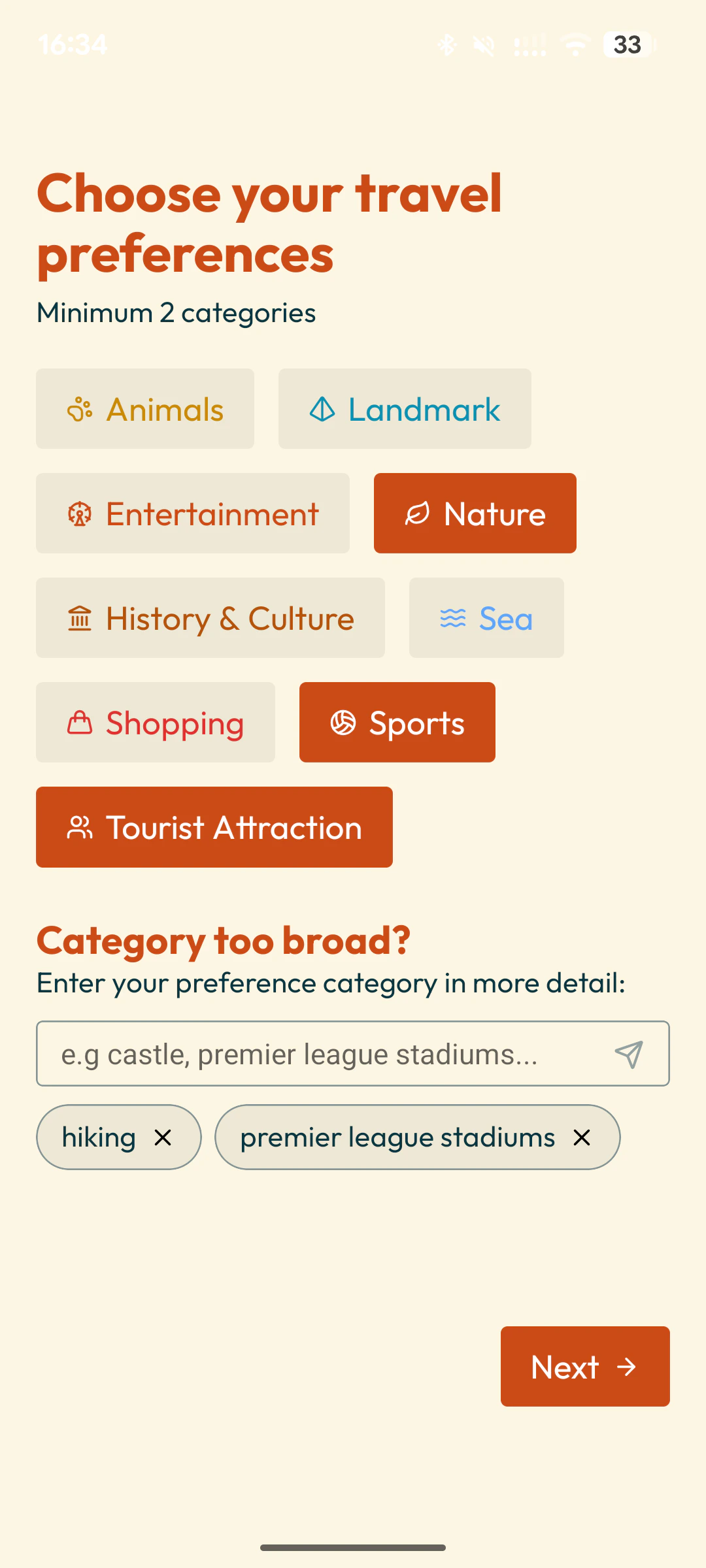
PreferenceArea — Pick a Geographic Area
An optional step that lets the user restrict recommendations to a specific geographical area of the UK in three levels: County, Region and Country.
- The Map Picker UI is displayed with interactive SVG specifically for Region and Country whereas the areas are sufficiently big.
- For County, it is displayed as a searchable list instead due to its small size.
geoFilter (e.g. ?area=Scotland).Users can skip this step; in that case recommendations are drawn from the full UK dataset.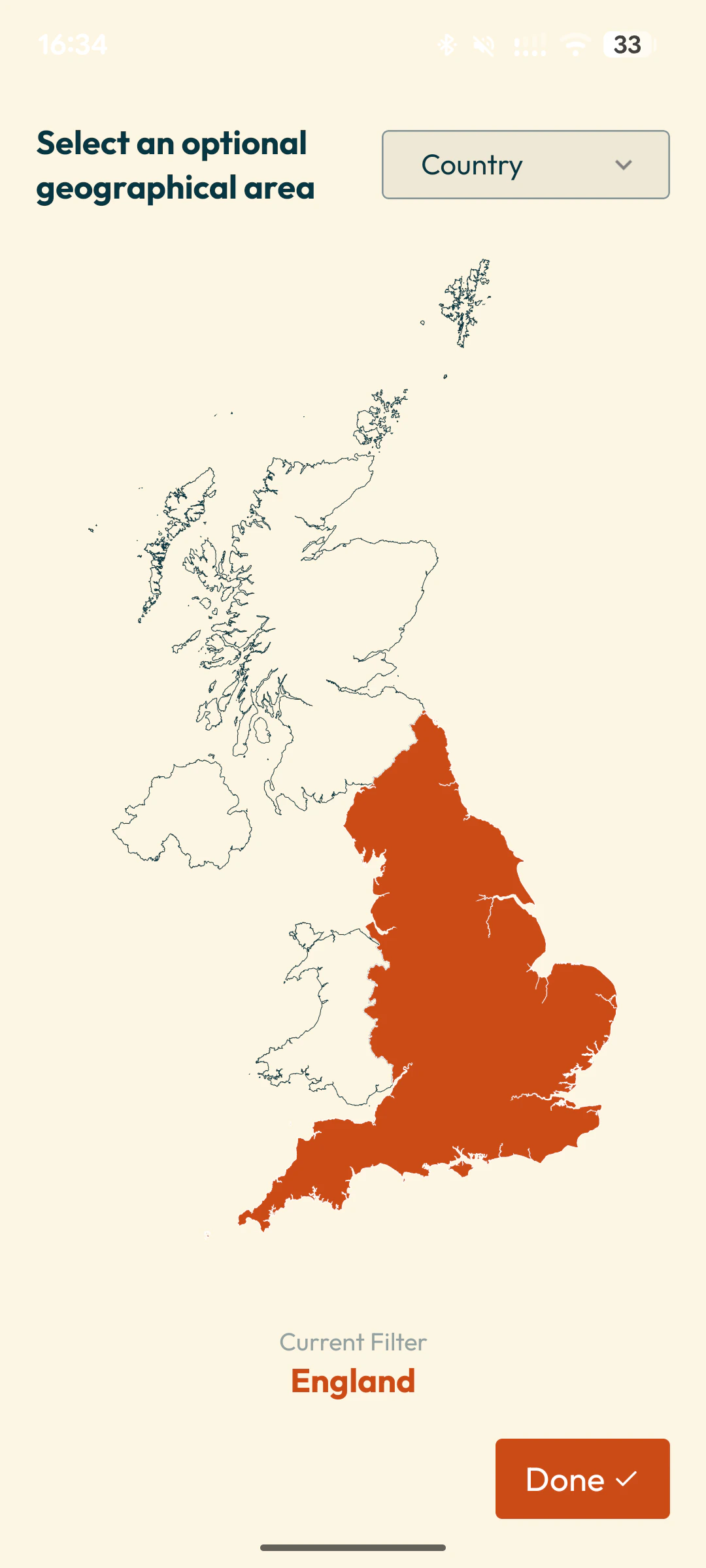
PreferenceImport — Import Visited Attractions
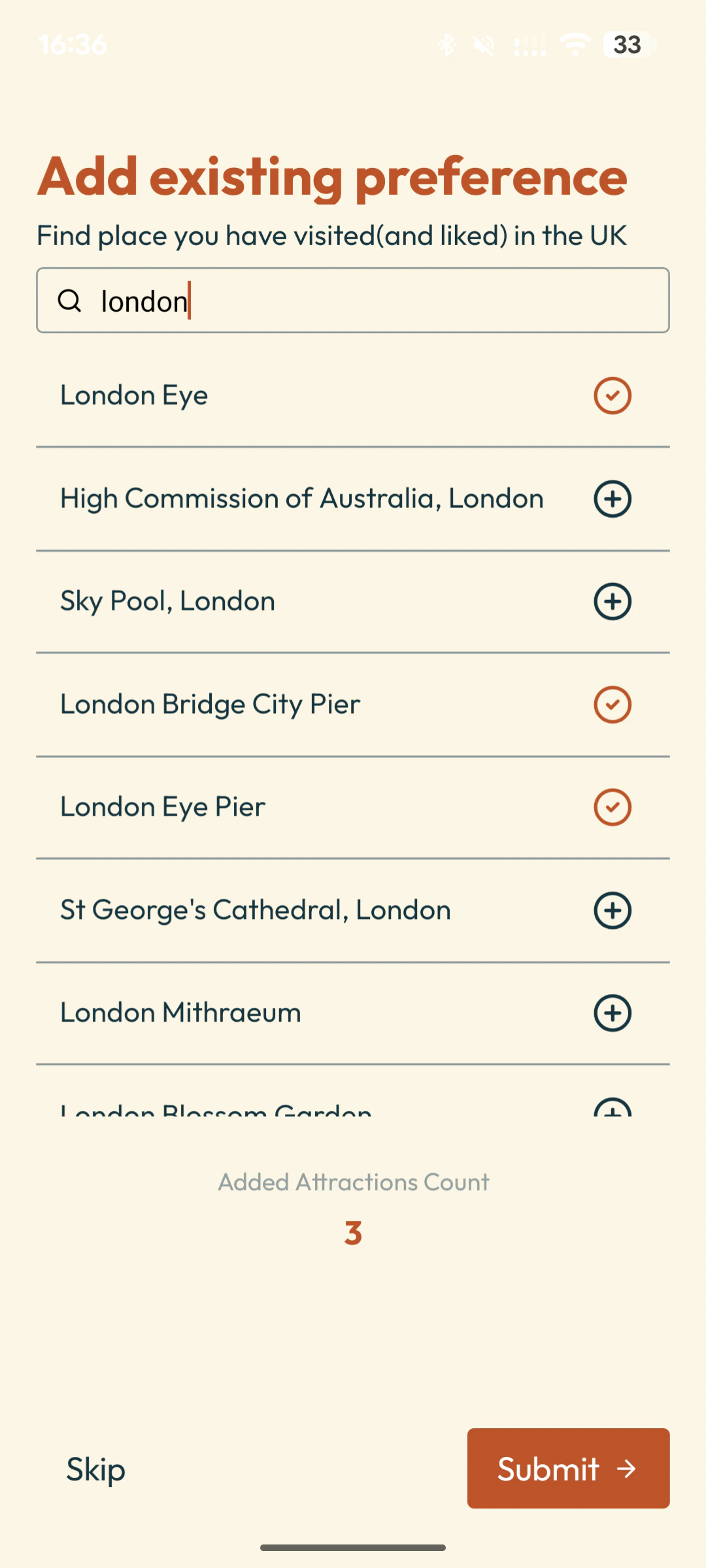
Allows the user to search for attractions they have already visited and bulk-import them as liked items. This seeds the recommendation engine with real historical signal before the user has made any in-app swipes.
- A search field calls
searchAttractions(name)(GET/recommendations/search?q=<name>) to find matching attractions. - Selected attractions are submitted via
addVisitedAttractions(ids)(POST/recommendations/like/bulk/). - This screen is also accessible from Settings via the
AttractionImportroute for users who want to add more visited places later.
Discovery Screen
TheDiscoveryScreen is the heart of the app — a continuously refreshing swipeable deck of personalised UK attraction cards.
Swipe Deck
Custom swipe animation from scratch, tailored from Rakha Wibowo’s. Each card shows the attraction image, name, category, and a short description. Swipe right to like, swipe left to dislike. The deck never empties thanks to automatic background pre-fetching.
Auto-Pagination
The
useRecommendations hook monitors currentIndex. When five or fewer cards remain in the local cache, it automatically fetches the next page from /recommendations (with the current geoFilter appended) and appends the new items to the deck.Swipe Actions
- Swipe right →
onSwipeRight(id)→likeMutation.mutate(id)→ callslikeAttraction(id)(POST/recommendations/like/<id>) → on success, invalidates thelikedHistoryquery so the Liked tab reflects the change immediately. - Swipe left →
onSwipeLeft(id)→ callsdislikeAttraction(id)directly (POST/recommendations/dislike/<id>).
Attraction Detail Sheet
Tapping a card (rather than swiping) opens a
@gorhom/bottom-sheet panel with extended details: full description, address, opening hours, and a link to an external website if available.Liked Screens
The Liked tab shows every attraction the user has swiped right on, organised for easy browsing and geographic exploration.LikedMain — Liked Attractions Grid
Fetches the full liked history via
getLikedAttraction() (GET /recommendations/history/liked) and renders a scrollable grid of attraction cards. Cards are grouped by geographic area, and each group header is a tappable button that navigates to LikedAreaScreen.Settings Screens
TheSettingsScreen (accessible from the Profile tab) contains two sub-screens for updating persistent user preferences:
UpdateGeoFilter
UpdateGeoFilter
Lets the user change their geographic recommendation area after onboarding. Selecting a new area writes the updated query-string fragment to AsyncStorage (
geoFilter). The next getRecommendations() call will use the new value. The current in-memory deck is not invalidated immediately — the change takes effect on the next page fetch.AttractionImport
AttractionImport
The same search-and-bulk-import screen used during onboarding (
PreferenceImport), but accessible at any time from Settings. Useful for users who have visited new places and want to keep the recommendation model up to date. Submits selections via addVisitedAttractions(ids) (POST /recommendations/like/bulk/).