
What is Source Grounding?

Source grounding is LangExtract’s ability to map every extraction back to its exact location in the original text at the character level. This enables visual highlighting, provenance tracking, and verification of extraction accuracy.
Why it matters: Source grounding transforms extractions from isolated data points into traceable, verifiable evidence anchored in the source document.

Character-Level Mapping

Every extraction includes a char_interval that specifies:
  • start_pos: Character position where the extraction begins (inclusive)
  • end_pos: Character position where the extraction ends (exclusive)
result = lx.extract(
    text_or_documents="ROMEO. But soft! What light through yonder window breaks?",
    prompt_description=prompt,
    examples=examples,
)

for extraction in result.extractions:
    print(f"Text: {extraction.extraction_text}")
    print(f"Position: {extraction.char_interval.start_pos}-{extraction.char_interval.end_pos}")
    print(f"Verified: {result.text[extraction.char_interval.start_pos:extraction.char_interval.end_pos]}")
Output:
Text: ROMEO
Position: 0-5
Verified: ROMEO

Text: But soft!
Position: 7-16
Verified: But soft!

How Source Grounding Works

LangExtract achieves source grounding through a multi-stage pipeline:

1. Tokenization

The input text is tokenized into tokens with character-level positions:
# From langextract.core.tokenizer
tokenized_text = tokenizer.tokenize("Patient takes aspirin 81mg daily.")

# Each token knows its character position:
# Token(text="Patient", char_interval=CharInterval(0, 7))
# Token(text="takes", char_interval=CharInterval(8, 13))
# Token(text="aspirin", char_interval=CharInterval(14, 21))
See chunking.py:169-214 for token interval text extraction.

2. LLM Extraction

The LLM generates structured extractions with text spans:
{
  "extractions": [
    {
      "extraction_class": "medication",
      "extraction_text": "aspirin 81mg",
      "attributes": {"dosage": "81mg"}
    }
  ]
}

3. Alignment

The resolver aligns extracted text to source positions using the WordAligner:
# From annotation.py:417-424
aligned_extractions = resolver.align(
    resolved_extractions,
    text_chunk.chunk_text,
    token_offset,      # Offset for chunked documents
    char_offset,       # Character offset in original text
    tokenizer_inst=tokenizer,
)
The aligner:
  1. Searches for exact matches in the source text
  2. Falls back to fuzzy matching if needed
  3. Computes character intervals for each match
  4. Adjusts offsets for chunked documents

4. Result Enrichment

Each extraction receives complete provenance:
class Extraction:
    extraction_text: str              # "aspirin 81mg"
    extraction_class: str             # "medication"
    attributes: dict                  # {"dosage": "81mg"}
    char_interval: CharInterval       # CharInterval(14, 26)
    token_interval: TokenInterval     # TokenInterval(2, 4)

Alignment Parameters

Fine-tune alignment behavior using resolver_params (see extraction.py:118-130):

Enable Fuzzy Alignment

Allow approximate matches when exact matching fails:
result = lx.extract(
    text_or_documents=text,
    prompt_description=prompt,
    examples=examples,
    resolver_params={
        'enable_fuzzy_alignment': True,  # Default
        'fuzzy_alignment_threshold': 0.75,  # Minimum 75% token overlap
    }
)
When to disable: Set enable_fuzzy_alignment=False for strict exact-match-only behavior. This improves performance but may reduce recall.

Accept Lesser Matches

Allow partial exact matches:
result = lx.extract(
    text_or_documents=text,
    prompt_description=prompt,
    examples=examples,
    resolver_params={
        'accept_match_lesser': True,  # Default
    }
)
Example:
  • Source text: "aspirin 81mg PO daily"
  • LLM output: "aspirin 81mg"
  • Result: Matches and aligns (partial match accepted)

Handling Chunked Documents

For long documents, LangExtract chunks the text and adjusts alignment offsets automatically.

Character Offset Adjustment

# From annotation.py:411-415
token_offset = text_chunk.token_interval.start_index
char_offset = text_chunk.char_interval.start_pos

aligned_extractions = resolver.align(
    resolved_extractions,
    text_chunk.chunk_text,
    token_offset,  # Adjust token positions
    char_offset,   # Adjust character positions
)
This ensures that extractions from chunk 2 have positions relative to the original document, not the chunk.

Example with Offsets

# Original document (1000 characters)
original_text = "...very long text..."

# Chunk 2: Characters 500-750
chunk_text = original_text[500:750]

# LLM extracts "aspirin" at position 14 in the chunk
# Alignment adjusts: 500 (offset) + 14 (chunk position) = 514
# Result: extraction.char_interval.start_pos = 514
See chunking.py:216-244 for character interval computation.

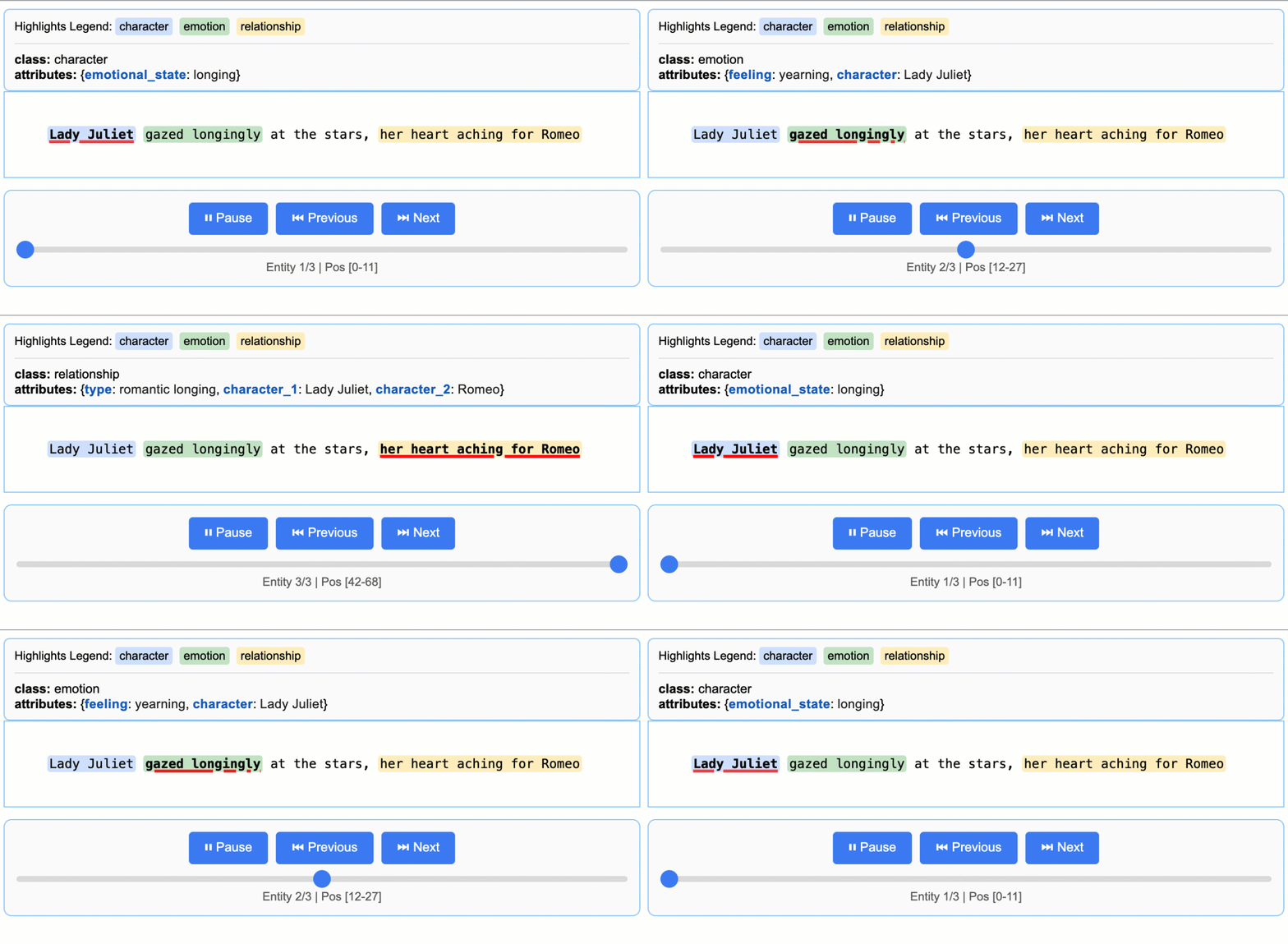
Visualization with Source Grounding

LangExtract generates interactive HTML visualizations using the character intervals:
lx.io.save_annotated_documents([result], output_name="results.jsonl", output_dir=".")
html_content = lx.visualize("results.jsonl")

with open("visualization.html", "w") as f:
    if hasattr(html_content, 'data'):
        f.write(html_content.data)
    else:
        f.write(html_content)
The visualization highlights each extraction at its exact position in the source text, enabling:
  • Visual verification: See extractions in context
  • Error detection: Spot misalignments or hallucinations
  • Quality assessment: Review extraction boundaries
Interactive visualization showing highlighted extractions

Debugging Alignment Issues

Check Alignment Status

Extractions without valid alignment have None character intervals:
for extraction in result.extractions:
    if extraction.char_interval is None:
        print(f"Failed to align: {extraction.extraction_text}")
    else:
        print(f"Aligned: {extraction.extraction_text} at {extraction.char_interval}")

Common Alignment Failures

LLM Paraphrasing

# Source text: "Patient has severe headache"
# LLM output: "Patient has bad headache"  # Paraphrased!
# Result: Alignment fails (no exact match)
Solution: Improve prompt to enforce verbatim extraction:
prompt = textwrap.dedent("""\
    Extract text EXACTLY as it appears.
    Do not paraphrase, summarize, or reword.""")

Hallucinated Extractions

# Source text: "Patient takes aspirin"
# LLM output: "Patient takes aspirin 81mg"  # Added dosage!
# Result: Alignment fails (text not found)
Solution: Be explicit in examples about what to extract:
examples = [
    lx.data.ExampleData(
        text="Patient takes aspirin",
        extractions=[
            lx.data.Extraction(
                extraction_text="aspirin",  # No dosage mentioned
                attributes={"dosage": "unknown"}
            )
        ]
    )
]

Suppress Parse Errors

Continue processing even when alignment fails:
result = lx.extract(
    text_or_documents=text,
    prompt_description=prompt,
    examples=examples,
    resolver_params={
        'suppress_parse_errors': True,  # Default: False
    }
)
Enabling suppress_parse_errors may hide underlying prompt quality issues. Use for exploration only—fix prompts for production.

Benefits of Source Grounding

1. Traceability

Every extraction links back to its source:
for extraction in result.extractions:
    source_text = result.text[
        extraction.char_interval.start_pos:
        extraction.char_interval.end_pos
    ]
    print(f"Extracted: {extraction.extraction_text}")
    print(f"Source: {source_text}")
    print(f"Match: {extraction.extraction_text == source_text}")

2. Verification

Validate extraction accuracy programmatically:
def verify_extractions(annotated_doc):
    """Check that all extractions match their source positions."""
    for extraction in annotated_doc.extractions:
        if extraction.char_interval is None:
            print(f"Warning: No position for {extraction.extraction_text}")
            continue
        
        source_text = annotated_doc.text[
            extraction.char_interval.start_pos:
            extraction.char_interval.end_pos
        ]
        
        if source_text != extraction.extraction_text:
            print(f"Mismatch: '{extraction.extraction_text}' vs '{source_text}'")
            return False
    
    return True

3. Downstream Processing

Use positions for additional analysis:
# Extract context windows
def get_context(text, char_interval, window=50):
    start = max(0, char_interval.start_pos - window)
    end = min(len(text), char_interval.end_pos + window)
    return text[start:end]

for extraction in result.extractions:
    context = get_context(result.text, extraction.char_interval)
    print(f"...{context}...")

4. Error Analysis

Identify systematic extraction issues:
# Find extractions that span multiple sentences
for extraction in result.extractions:
    span_text = result.text[
        extraction.char_interval.start_pos:
        extraction.char_interval.end_pos
    ]
    if '.' in span_text or '\n' in span_text:
        print(f"Cross-boundary extraction: {extraction.extraction_text}")
Technical Implementation

The source grounding system uses:
  • Token intervals: Track token-level positions (see chunking.py:40-58)
  • Character intervals: Map tokens to character positions (see chunking.py:125-140)
  • Word alignment: Match extracted text to source (resolver.WordAligner)
  • Offset tracking: Adjust positions in chunked documents (see annotation.py:406-433)

Next Steps

Chunking Strategy

Learn how chunking affects alignment

Prompt Engineering

Improve alignment through better prompts

Build docs developers (and LLMs) love