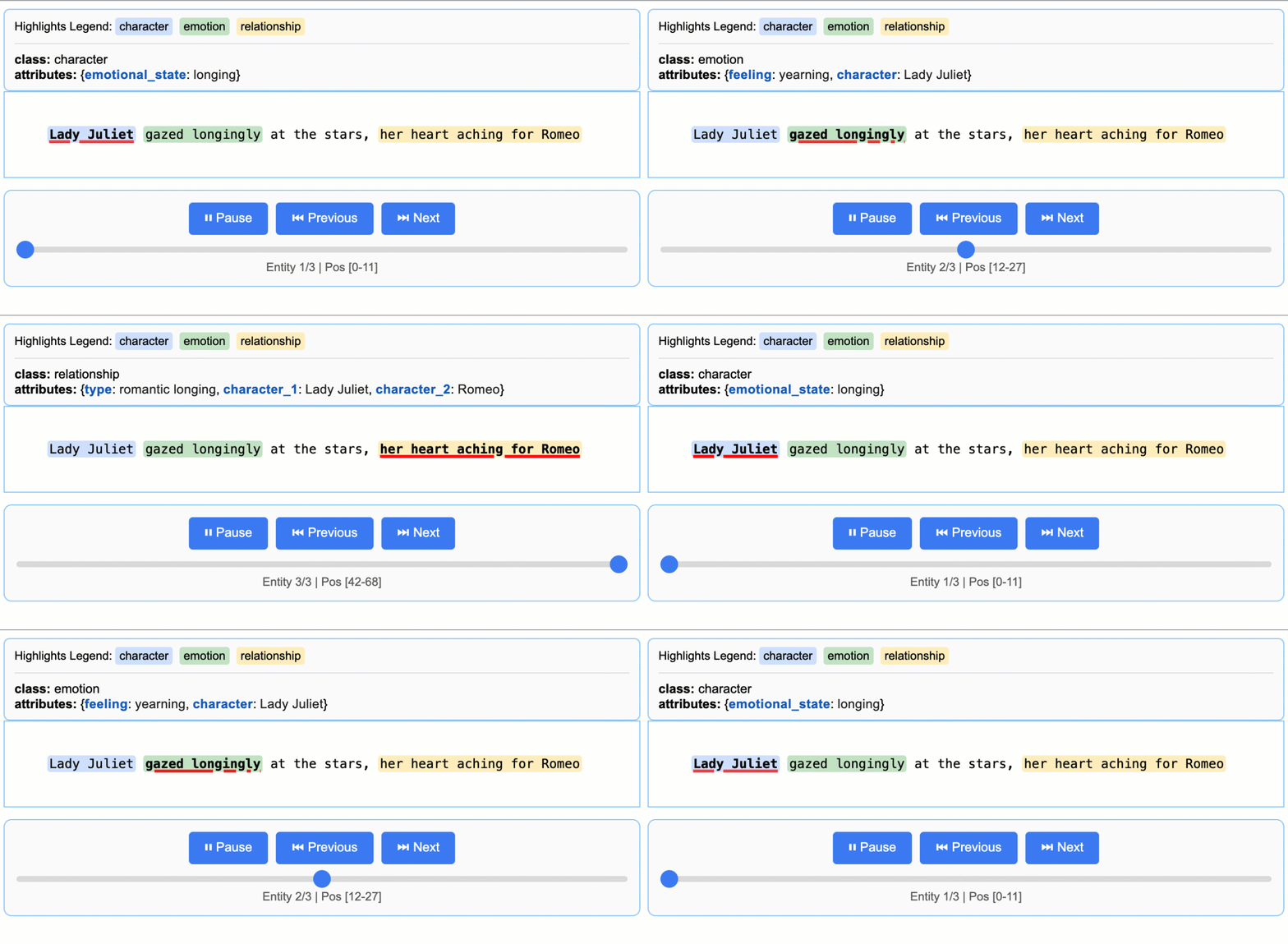
Let’s extract characters, emotions, and relationships from a Romeo and Juliet text using LangExtract.
1
Define Your Extraction Task
Create a prompt that describes what you want to extract, then provide a high-quality example:
import langextract as lximport textwrap# 1. Define the prompt and extraction rulesprompt = textwrap.dedent("""\ Extract characters, emotions, and relationships in order of appearance. Use exact text for extractions. Do not paraphrase or overlap entities. Provide meaningful attributes for each entity to add context.""")# 2. Provide a high-quality example to guide the modelexamples = [ lx.data.ExampleData( text="ROMEO. But soft! What light through yonder window breaks? It is the east, and Juliet is the sun.", extractions=[ lx.data.Extraction( extraction_class="character", extraction_text="ROMEO", attributes={"emotional_state": "wonder"} ), lx.data.Extraction( extraction_class="emotion", extraction_text="But soft!", attributes={"feeling": "gentle awe"} ), lx.data.Extraction( extraction_class="relationship", extraction_text="Juliet is the sun", attributes={"type": "metaphor"} ), ] )]
Examples drive model behavior. Each extraction_text should be verbatim from the example’s text (no paraphrasing), listed in order of appearance. LangExtract raises “Prompt alignment” warnings if examples don’t follow this pattern.
2
Run the Extraction
Provide your input text and prompt materials to the lx.extract() function:
# The input text to be processedinput_text = "Lady Juliet gazed longingly at the stars, her heart aching for Romeo"# Run the extractionresult = lx.extract( text_or_documents=input_text, prompt_description=prompt, examples=examples, model_id="gemini-2.5-flash",)
Model Selection: gemini-2.5-flash is the recommended default, offering an excellent balance of speed, cost, and quality. For highly complex tasks requiring deeper reasoning, gemini-2.5-pro may provide superior results.
3
Visualize the Results
Save extractions to a JSONL file and generate an interactive HTML visualization:
# Save the results to a JSONL filelx.io.save_annotated_documents([result], output_name="extraction_results.jsonl", output_dir=".")# Generate the visualization from the filehtml_content = lx.visualize("extraction_results.jsonl")with open("visualization.html", "w") as f: if hasattr(html_content, 'data'): f.write(html_content.data) # For Jupyter/Colab else: f.write(html_content)
This creates an animated and interactive HTML file showing extracted entities highlighted in their original context.
import langextract as lximport textwrap# Define the extraction taskprompt = textwrap.dedent("""\ Extract characters, emotions, and relationships in order of appearance. Use exact text for extractions. Do not paraphrase or overlap entities. Provide meaningful attributes for each entity to add context.""")examples = [ lx.data.ExampleData( text="ROMEO. But soft! What light through yonder window breaks? It is the east, and Juliet is the sun.", extractions=[ lx.data.Extraction( extraction_class="character", extraction_text="ROMEO", attributes={"emotional_state": "wonder"} ), lx.data.Extraction( extraction_class="emotion", extraction_text="But soft!", attributes={"feeling": "gentle awe"} ), lx.data.Extraction( extraction_class="relationship", extraction_text="Juliet is the sun", attributes={"type": "metaphor"} ), ] )]# Run extractioninput_text = "Lady Juliet gazed longingly at the stars, her heart aching for Romeo"result = lx.extract( text_or_documents=input_text, prompt_description=prompt, examples=examples, model_id="gemini-2.5-flash",)# Save and visualizelx.io.save_annotated_documents([result], output_name="extraction_results.jsonl", output_dir=".")html_content = lx.visualize("extraction_results.jsonl")with open("visualization.html", "w") as f: if hasattr(html_content, 'data'): f.write(html_content.data) else: f.write(html_content)print("Extraction complete! Open visualization.html to view results.")
For larger texts, process entire documents directly from URLs with parallel processing:
# Process Romeo & Juliet directly from Project Gutenbergresult = lx.extract( text_or_documents="https://www.gutenberg.org/files/1513/1513-0.txt", prompt_description=prompt, examples=examples, model_id="gemini-2.5-flash", extraction_passes=3, # Improves recall through multiple passes max_workers=20, # Parallel processing for speed max_char_buffer=1000 # Smaller contexts for better accuracy)
This approach can extract hundreds of entities from full novels (147,843+ characters) while maintaining high accuracy. The interactive visualization seamlessly handles large result sets.