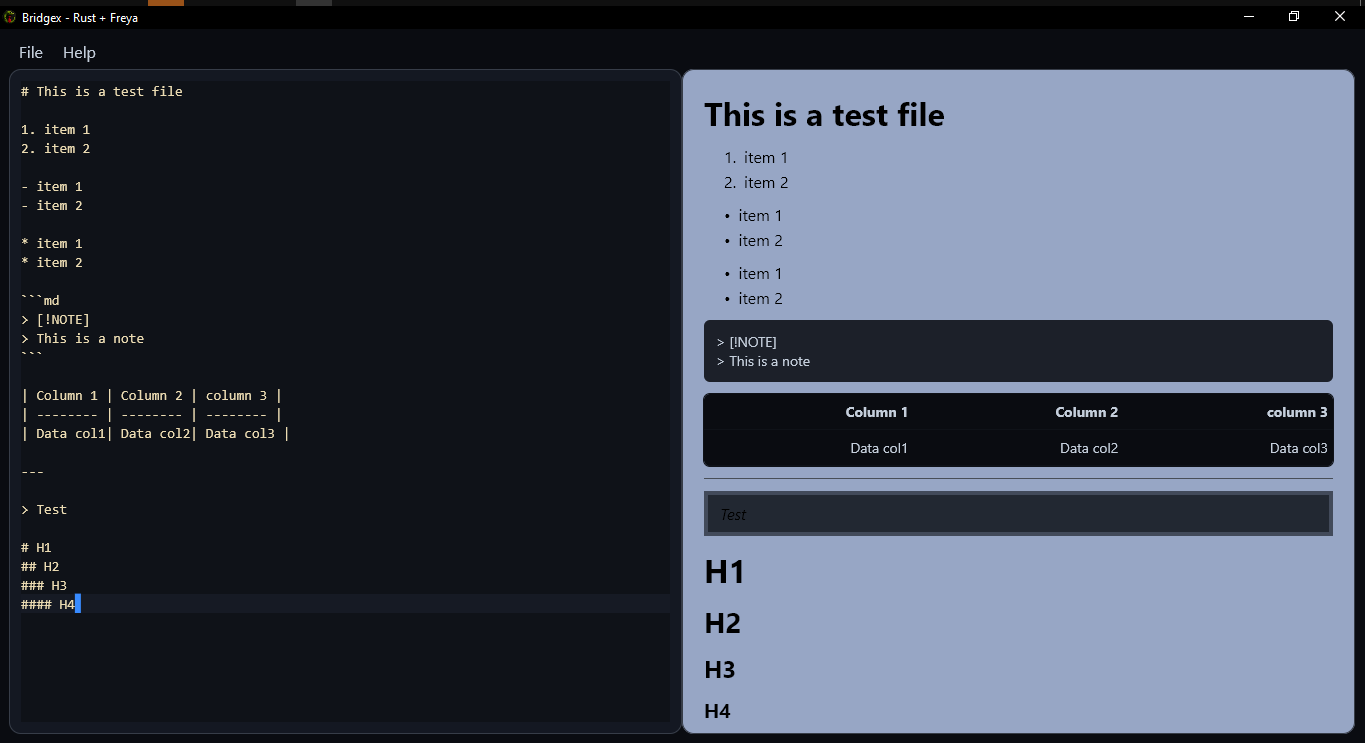
BridgeX is a desktop application from the Dev Forge ecosystem that provides a graphical interface for interacting with large language models (LLMs). This page covers the CDN-hosted assets for BridgeX — including its logo, animated logo variant, and UI screenshots showing the main chat screen, LLM configuration panel, and markdown rendering view — all delivered via jsDelivr from theDocumentation Index
Fetch the complete documentation index at: https://mintlify.com/tutosrive/images-projects-srm-trg/llms.txt
Use this file to discover all available pages before exploring further.
tutosrive/images-projects-srm-trg repository.
Tool Overview
BridgeX brings LLM conversations to the desktop with a focused feature set: a clean main chat screen, a dedicated LLM configuration panel for wiring up different model backends, and first-class markdown rendering so that model responses with code blocks, headings, and lists display correctly rather than as raw text. The application is designed for developers and power users who want a standalone desktop client for AI interactions without relying on browser-based interfaces. The asset collection documents each major screen of the UI, making it easy to include polished screenshots in release notes, README files, and documentation pages.Available CDN Assets
All assets below are served via jsDelivr at the base URL:https://cdn.jsdelivr.net/gh/tutosrive/images-projects-srm-trg@main/
| Asset | File path | CDN URL |
|---|---|---|
| Logo (WebP) | dev2forge/logos/bridgex-v0.1.0.webp | Link |
| Animated Logo | dev2forge/pymd/bridgex/bridgex-logo-animated.webp | Link |
| Main Screen | dev2forge/bridgex/1-main-screen.png | Link |
| LLM Config Panel | dev2forge/bridgex/2-llm-config.png | Link |
| Markdown Render View | dev2forge/bridgex/3-markdown-render.png | Link |
Main Screen
LLM Config

Markdown Render