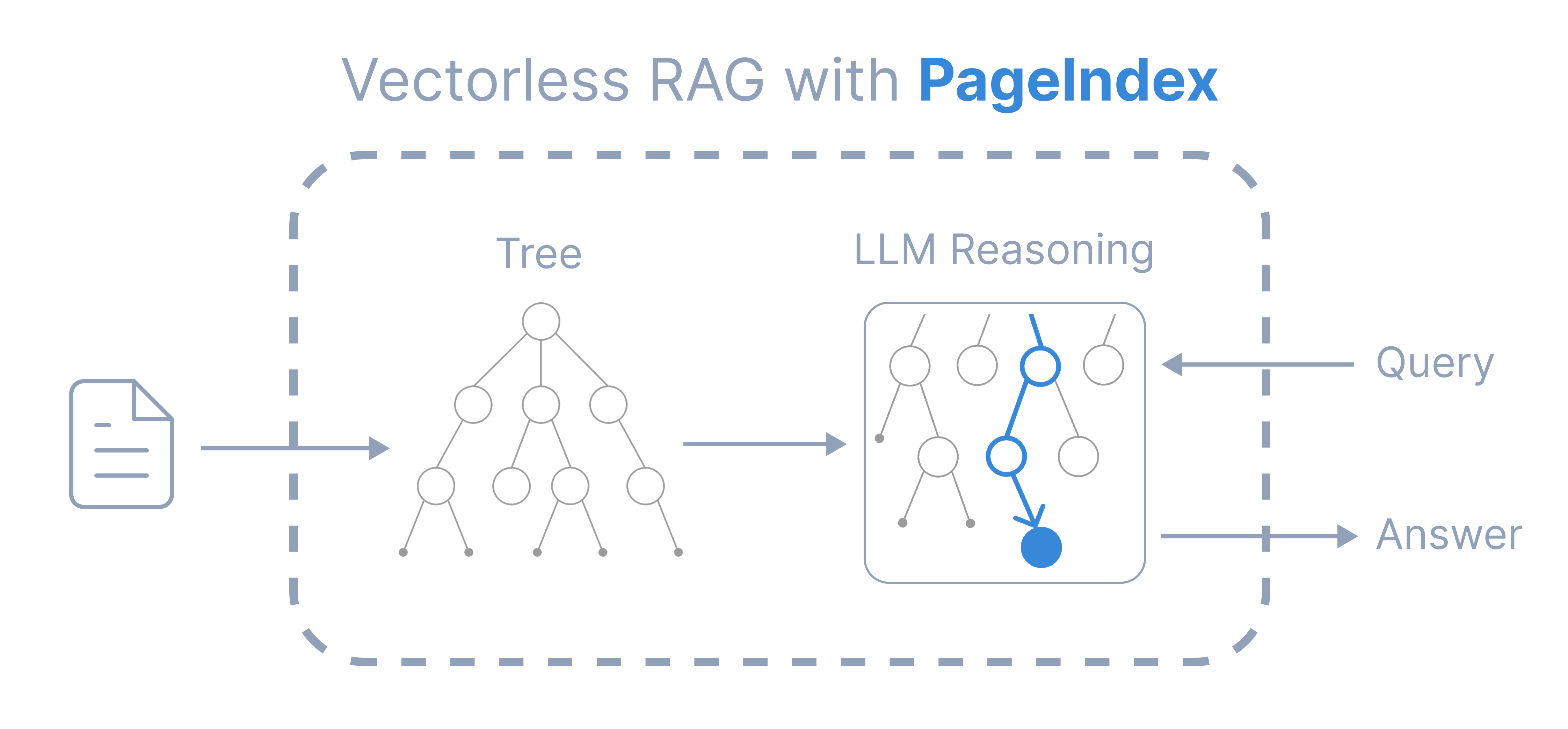
Similarity-based RAG based on Vector-DB has shown big limitations in recent AI applications. Reasoning-based or agentic retrieval has become important in current developments.PageIndex Chat is an AI assistant that allows you to chat with multiple super-long documents without worrying about limited context or context rot problems. It is based on PageIndex, a vectorless reasoning-based RAG framework which gives more transparent and reliable results like a human expert.You can now access PageIndex Chat with API or SDK.
from pageindex import PageIndexClient# Get your PageIndex API key from https://dash.pageindex.ai/api-keysPAGEINDEX_API_KEY = "Your API KEY"pi_client = PageIndexClient(api_key=PAGEINDEX_API_KEY)
from pprint import pprintdoc_info = pi_client.get_document(doc_id)pprint(doc_info)if doc_info['status'] == 'completed': print(f"\n Document ready! ({doc_info['pageNum']} pages)")elif doc_info['status'] == 'processing': print("\n Document is still processing. Please wait and check again.")
Output:
{'createdAt': '2025-11-20T07:11:44.669000',
 'description': "This document is NVIDIA Corporation's Form 10-Q Quarterly "
                'Report for the period ending October 26, 2025, detailing its '
                'financial performance, operational results, market risks, and '
                'legal proceedings.',
 'id': 'pi-cmi73f7r7022y09nwn40paaom',
 'name': '13e6981b-95ed-4aac-a602-ebc5865d0590.pdf',
 'pageNum': 48,
 'status': 'completed'}

 Document ready! (48 pages)
Processing time depends on document length. The status will be 'processing' while PageIndex generates the document tree structure, and 'completed' when ready.
Use the Chat API to ask questions about the document:
query = "what is the revenue? Also show me which page I can find it."for chunk in pi_client.chat_completions( messages=[{"role": "user", "content": query}], doc_id=doc_id, stream=True): print(chunk, end='', flush=True)
Sample Output:
I'll help you find the revenue information from NVIDIA's 10-Q report. Let me first check the document structure to locate the financial information.Now let me get the content from pages that contain the revenue information. Based on the structure, revenue information should be in the financial statements section, which appears early in the document. Let me check pages 3-8 which should contain the Condensed Consolidated Statements of Income.Perfect! I found the revenue information. Let me provide you with the details:## Revenue Information from NVIDIA's 10-Q Report**You can find the revenue on Page 3** of the document in the **Condensed Consolidated Statements of Income**.### Revenue Details:**For the Three Months Ended October 26, 2025 (Q3 FY2026):**- **Revenue: $57,006 million** ($57.0 billion)- Compared to Q3 FY2025 (October 27, 2024): $35,082 million**For the Nine Months Ended October 26, 2025 (First 9 months of FY2026):**- **Revenue: $147,811 million** ($147.8 billion)- Compared to same period FY2025: $91,166 million### Key Highlights:- Q3 revenue increased by **62.5%** year-over-year ($21.9 billion increase)- Nine-month revenue increased by **62.1%** year-over-year ($56.6 billion increase)- This represents strong growth driven primarily by Data Center compute and networking platforms for AI and accelerated computing, with Blackwell architectures being a major contributorThe revenue figures are clearly displayed at the top of the Condensed Consolidated Statements of Income on **Page 3** of the 10-Q report.
Maintain conversation history for follow-up questions:
messages = [ {"role": "user", "content": "What is the revenue?"}, {"role": "assistant", "content": "The revenue for Q3 FY2026 is $57,006 million..."}, {"role": "user", "content": "How does this compare to last year?"}]for chunk in pi_client.chat_completions( messages=messages, doc_id=doc_id, stream=True): print(chunk, end='', flush=True)

 You can now access PageIndex Chat with API or SDK.