192.168.10.2.
Install the Wazuh indexer
Download the installation script and default configuration template, adjust the component IP addresses, generate the configuration files, install the indexer, then start the cluster.ValidationAfter installation, confirm the indexer is reachable and the cluster initialised successfully.Result: The indexer responded on port
Edit
config.yml so that the indexer, server, and dashboard entries all reference the correct IP address of the Wazuh VM before generating config files.9200, the node appeared as node-1, and the cluster initialised successfully.Install the Wazuh server
With the indexer running, install the Wazuh server component.Result: The installation completed successfully. This step automatically installed and configured the following:
- Wazuh manager
- Vulnerability detection configuration
- Filebeat installation and service startup
Security considerations
After deployment, the credentials for the default accountswazuh and wazuh-wui were changed by following the Securing the Wazuh server API guide.
This lab environment is isolated within a dedicated VLAN with firewall-restricted access. Several hardening steps that would be required in production were therefore not applied here.
- Restricting indexer API access to the Wazuh server only
- Enforcing a minimum TLS version of 1.2
- Replacing the default self-signed certificate with a trusted certificate
- Enabling audit logging on the indexer
- Hardening the underlying OS against CIS benchmarks
- Applying RBAC with least-privilege access to the Wazuh API
Network and firewall configuration
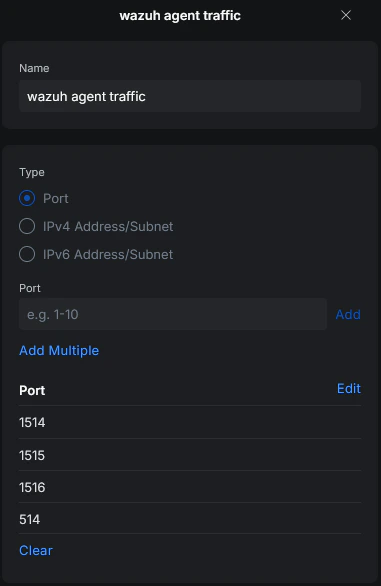
Before onboarding agents, the required ports for communication between Wazuh components and agents were reviewed. For this setup:- All Wazuh core components run on the same VM
- No separate firewall rules were required between the internal Wazuh components
- Only agent-to-server communication needed to be allowed
- Dashboard access was restricted to the admin workstation
Network overview
| VLAN | Name | Role |
|---|---|---|
| VLAN 2 | Home | Permitted to send agent traffic to the Wazuh server |
| VLAN 10 | Lab-Security | Contains the Wazuh VM and lab systems (home-lab-dc-01, home-lab-ubuntu-01, home-lab-client-01) |

Agent deployment
Windows
The first agent was deployed on the admin workstationhome-home-paw-01. The official Wazuh documentation for Windows agent deployment was followed. After completing the installation and configuration steps, the agent connected to the Wazuh manager and appeared in the dashboard.

Linux
The Linux agent deployment process followed the same steps as the Windows deployment. The main difference was selecting the correct package for the target distribution and CPU architecture. The Linux agent also appeared successfully in the dashboard after installation.Additional agents
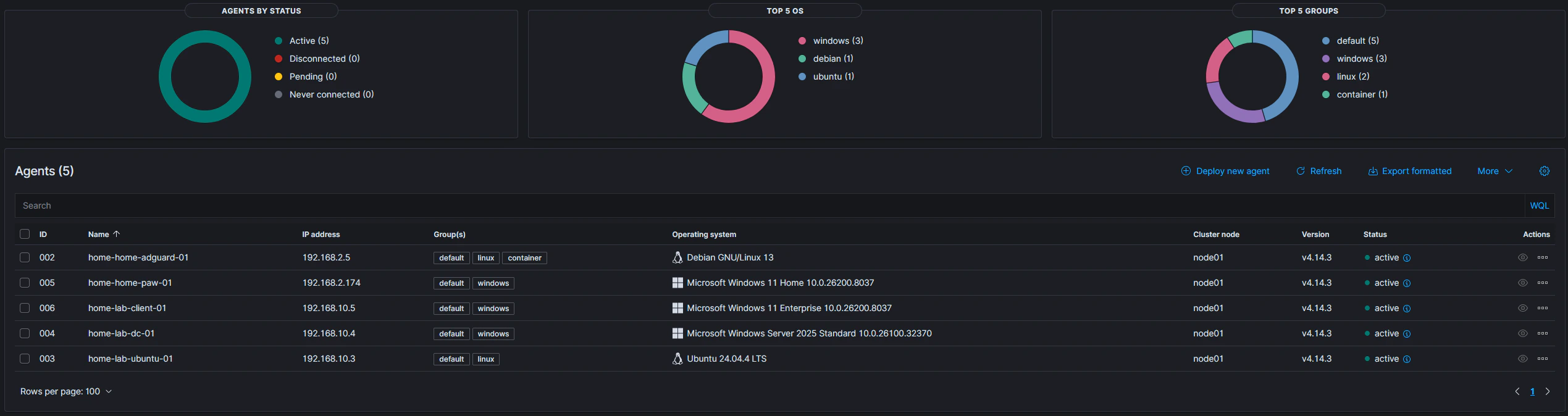
After the first successful deployments, the same onboarding steps were repeated for the following systems:home-lab-dc-01home-lab-client-01home-lab-ubuntu-01
Current agent overview