Overview
This project documents the deployment of a dedicated Wazuh all-in-one instance on an Ubuntu VM running on Proxmox. The goal was to build a cleaner and more realistic SIEM lab than a previous Docker-based deployment on a Synology NAS, onboard Windows and Linux endpoints, validate centralized monitoring across multiple systems, implement integrations, and rebuild an Active Directory structure.Why Wazuh
Before building the lab, several SIEM options were evaluated:Splunk
Strong detection capabilities and SPL query language, but licensing costs make it impractical for a home lab at meaningful data volumes.
Elastic Stack
Powerful platform but requires significant tuning and lacks built-in security modules out of the box.
Microsoft Sentinel
Requires Azure infrastructure — an on-prem solution was preferred for this lab.
Wazuh
Provides endpoint monitoring, log collection, FIM, active response, vulnerability detection, CIS benchmarking, and native MITRE ATT&CK mapping in a single open-source platform with no license constraints.
Project Goals
The main objectives of this project were to:- Move Wazuh from a shared Docker environment to a dedicated VM
- Isolate security tooling from general homelab services
- Onboard and validate endpoints from multiple operating systems
- Build a foundational Windows Server and Active Directory monitoring setup
- Explore SIEM-specific features such as integrations, FIM, decoders/rules, and more
Environment Summary
The Wazuh environment is deployed as a single-node all-in-one installation on a dedicated Ubuntu VM hosted on Proxmox.| Hostname | Operating System | Role | IP Address | VLAN |
|---|---|---|---|---|
home-lab-wazuh-01 | Ubuntu Server 22.04 | SIEM Server | 192.168.10.2 | VLAN 10 (Lab-Security) |
home-home-paw-01 | Windows 11 | Personal Workstation | DHCP | VLAN 2 (Home) |
home-lab-dc-01 | Windows Server 2025 | Domain Controller | 192.168.10.4 | VLAN 10 (Lab-Security) |
home-lab-client-01 | Windows 11 Enterprise | Lab Client | 192.168.10.5 | VLAN 10 (Lab-Security) |
home-lab-ubuntu-01 | Ubuntu Server 22.04 | Lab Server | 192.168.10.3 | VLAN 10 (Lab-Security) |
home-home-adguard-01 | DietPi (Debian) | Docker Host / DNS / VPN | 192.168.2.5 | VLAN 2 (Home) |
Architecture
The Wazuh server (home-lab-wazuh-01) runs as a single-node all-in-one deployment on VLAN 10 (Lab-Security). Agents from both VLAN 2 (Home) and VLAN 10 (Lab-Security) communicate with the server over the allowed firewall paths, while dashboard access is restricted to the personal workstation.
Implementation Overview
The deployment was completed in six stages:Provision the VM
A dedicated Ubuntu Server VM was provisioned on Proxmox to host the Wazuh all-in-one installation, replacing the previous Docker-based setup on a Synology NAS.
Install Wazuh (all-in-one)
Wazuh was installed as a single-node all-in-one deployment using the Wazuh installation assistant. This covered the Indexer, Server (including Filebeat), and Dashboard components.
Validate core components
The Wazuh Dashboard, Server, and Indexer were validated as reachable and operational. The indexer cluster initialized successfully on port
9200 and the dashboard became available at https://192.168.10.2:443.Configure firewall rules for agent communication
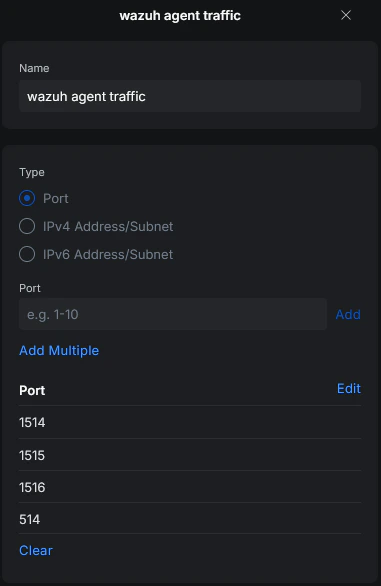
Firewall rules were created to allow agent traffic from VLAN 2 (Home) and VLAN 10 (Lab-Security) to the Wazuh server. Dashboard access was restricted to the personal workstation
home-home-paw-01.Onboard Windows and Linux agents
The first Windows agent was deployed on
home-home-paw-01, followed by a Linux agent. After successful validation, the remaining lab systems (home-lab-dc-01, home-lab-client-01, home-lab-ubuntu-01) were onboarded using the same process.Network and Access Control
To allow communication between agents and the Wazuh server, the required Wazuh ports were reviewed and firewall rules were created accordingly.- VLAN 2 (Home)
- VLAN 10 (Lab-Security)
- Dashboard Access
Agent traffic from VLAN 2 is allowed to reach the Wazuh server on VLAN 10. This covers the personal workstation
home-home-paw-01 and the AdGuard/Docker host home-home-adguard-01.All Wazuh core components (Indexer, Server, Dashboard) run on the same VM. No internal firewall rules between components were required — only agent-to-server communication needed to be explicitly allowed.

Validation Results
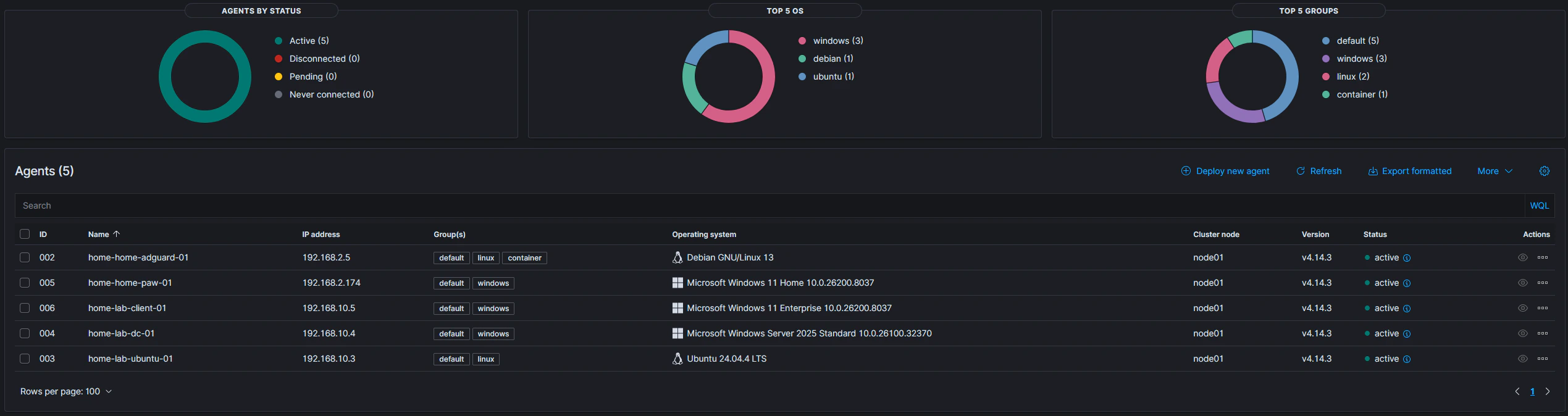
The following points were successfully validated after deployment:- Wazuh Dashboard, Server, and Indexer were installed and reachable
- Multiple Windows and Linux agents were enrolled successfully
- Active agent status was visible in the dashboard
- Operating system identification, configuration assessment, and software identification worked correctly
Challenges and Lessons Learned
VLAN routing issue — missing static route on Fritzbox
VLAN routing issue — missing static route on Fritzbox
After creating VLAN 10 (Lab-Security) for the lab environment, systems on that network were unable to reach the internet for updates. The root cause was a missing static route on the upstream gateway (Fritzbox).Because the network path is
Internet → Fritzbox → UniFi Gateway → internal VLANs, the Fritzbox had no return route for the new 192.168.10.0/24 subnet. Adding a static route on the Fritzbox pointing to the UniFi Gateway resolved the issue.This reinforced the importance of validating routing tables across all network hops when adding new segments — not just the local gateway.Missing Docker events — known bug
Missing Docker events — known bug
Some time was spent troubleshooting missing Docker events before identifying a known bug in the Docker integration. Details are documented in the Docker section of the telemetry documentation.
Current Scope
This repository currently focuses on:- Initial Wazuh deployment and validation
- Network access control for agent communication
- Windows and Linux agent onboarding
- Early detection engineering and telemetry improvements
- VirusTotal integration and active response testing
- Sysmon for Windows and Linux
- Docker event monitoring and CIS benchmark checks
- Custom detection rules
- Dashboard development