Active Directory Security
Monitors identity and authentication events across the AD environment, including logon patterns, account changes, and privileged activity.
VirusTotal
Tracks file hash submissions to VirusTotal, surfaces detections, and shows remediation status and submission trends over time.
Anomaly Detection
Provides a broad, environment-wide view of unusual activity — designed for daily triage across all monitored endpoints.
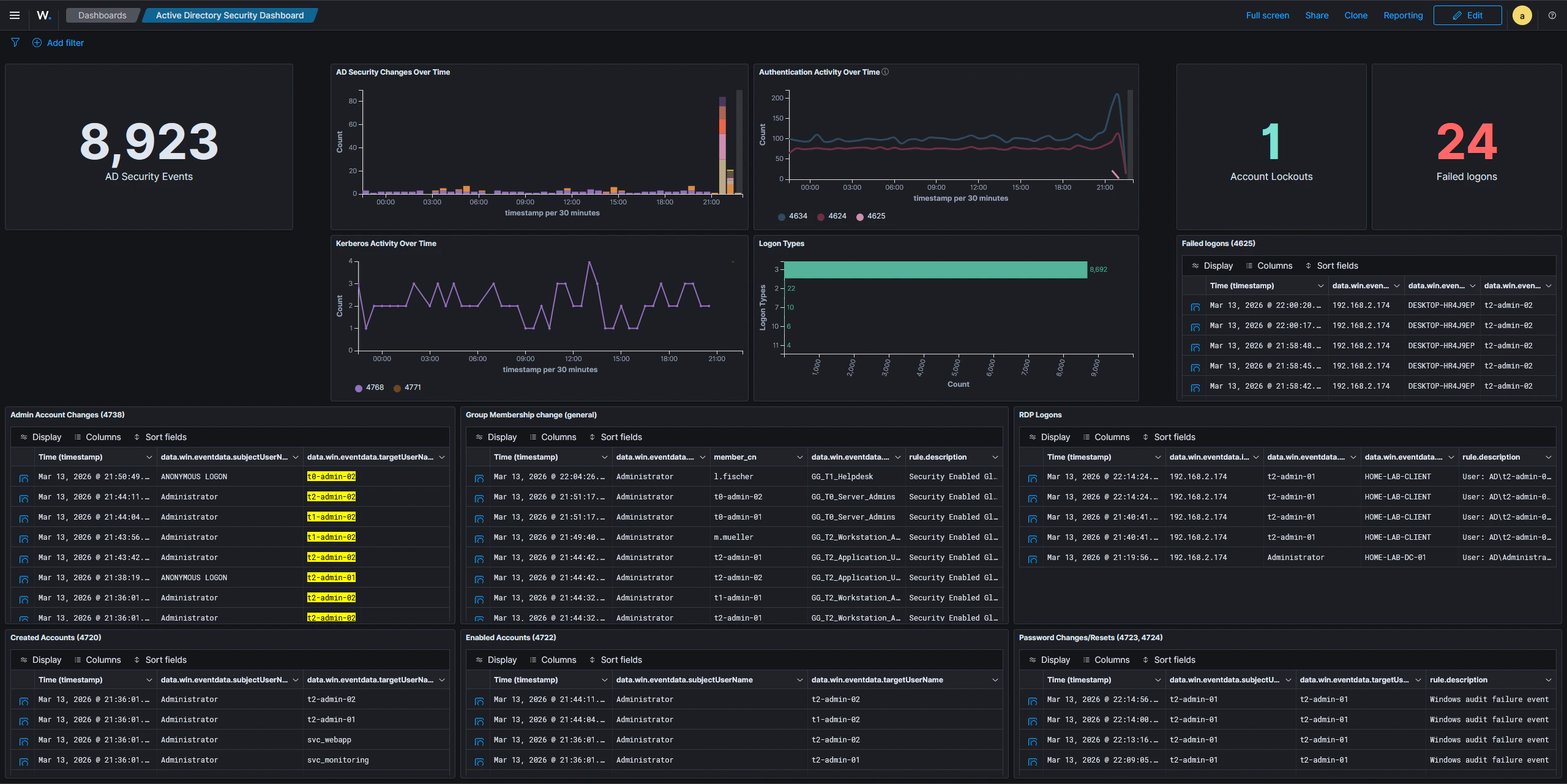
Active Directory Security Dashboard
This dashboard provides a quick overview of Active Directory activity, consolidating the most security-relevant Windows event categories into a single view. It is useful for spotting suspicious authentication attempts, unauthorized account changes, and unusual access patterns at a glance. The dashboard includes panels for:- General AD event activity — a timeline and count of all AD-related events, giving a baseline sense of volume and any unusual spikes
- Logon types and authentication patterns — breaks down logons by type (interactive, network, remote interactive, etc.) to distinguish normal user sessions from potentially suspicious access
- Newly created user accounts — surfaces account creation events so newly provisioned or rogue accounts are immediately visible
- Administrative account changes — tracks modifications to privileged accounts, including password resets and attribute changes performed by administrators
- Group membership modifications — captures additions and removals from security groups, particularly sensitive ones like Domain Admins
- RDP logons — highlights remote desktop sessions, which are a common lateral movement vector
- Password changes — logs both self-service and admin-initiated password changes, helping identify unauthorized credential modifications
VirusTotal Dashboard
This dashboard tracks activity from the VirusTotal integration, giving visibility into file reputation checks triggered across monitored endpoints. The dashboard covers:- File hash submissions and results — shows each file hash submitted to VirusTotal along with the verdict returned, so detections are easy to review
- Detection and remediation status — surfaces files flagged as malicious and tracks whether the active response (automatic file removal) has fired
- Submission activity over time — a time-series view of how many hashes are being submitted, useful for spotting unusual bursts of new file activity on endpoints
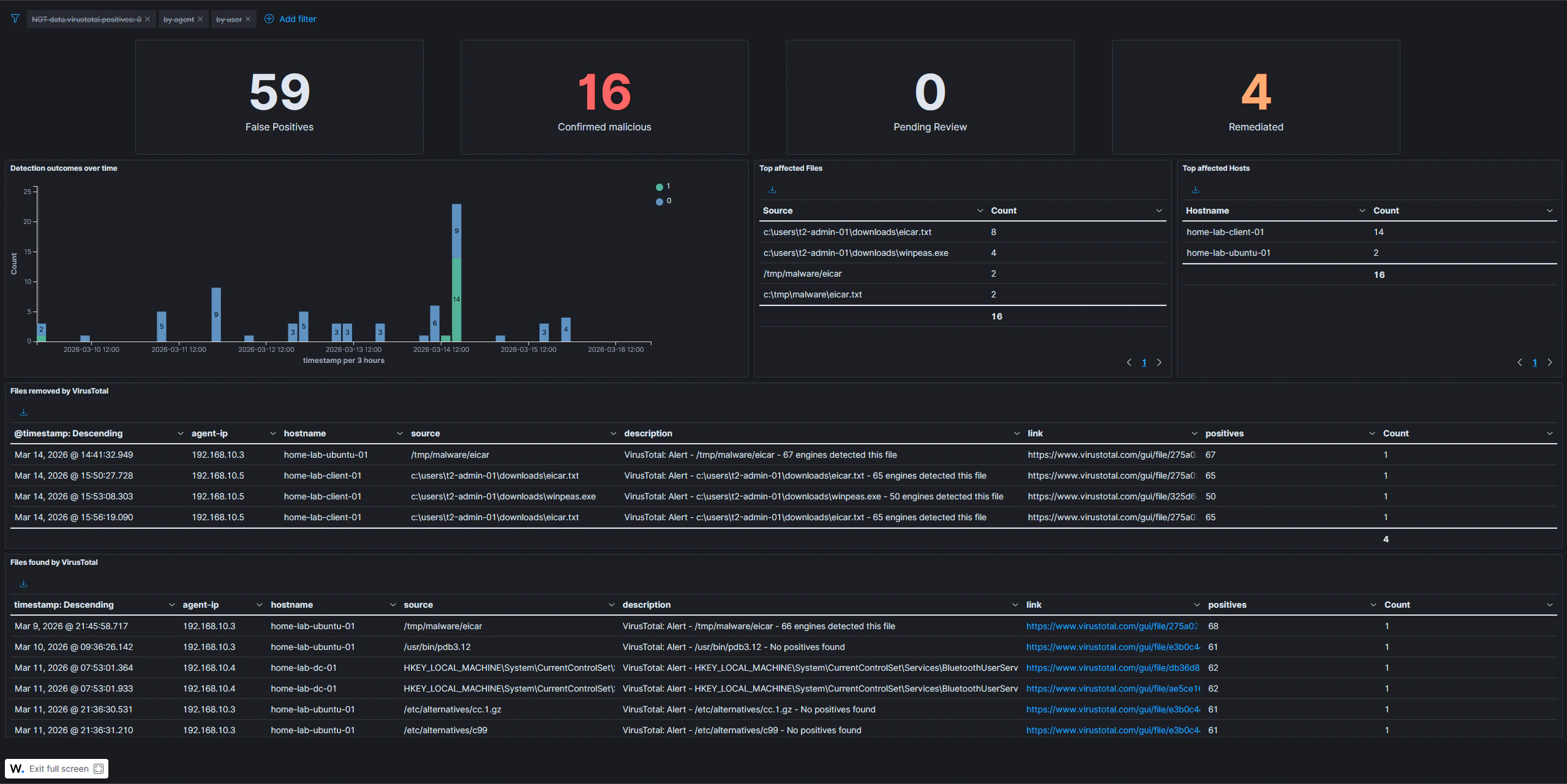
The VirusTotal dashboard depends on the VirusTotal integration being configured and active response rules being in place. Submissions only appear when Wazuh FIM detects a new or modified file and triggers a hash lookup.
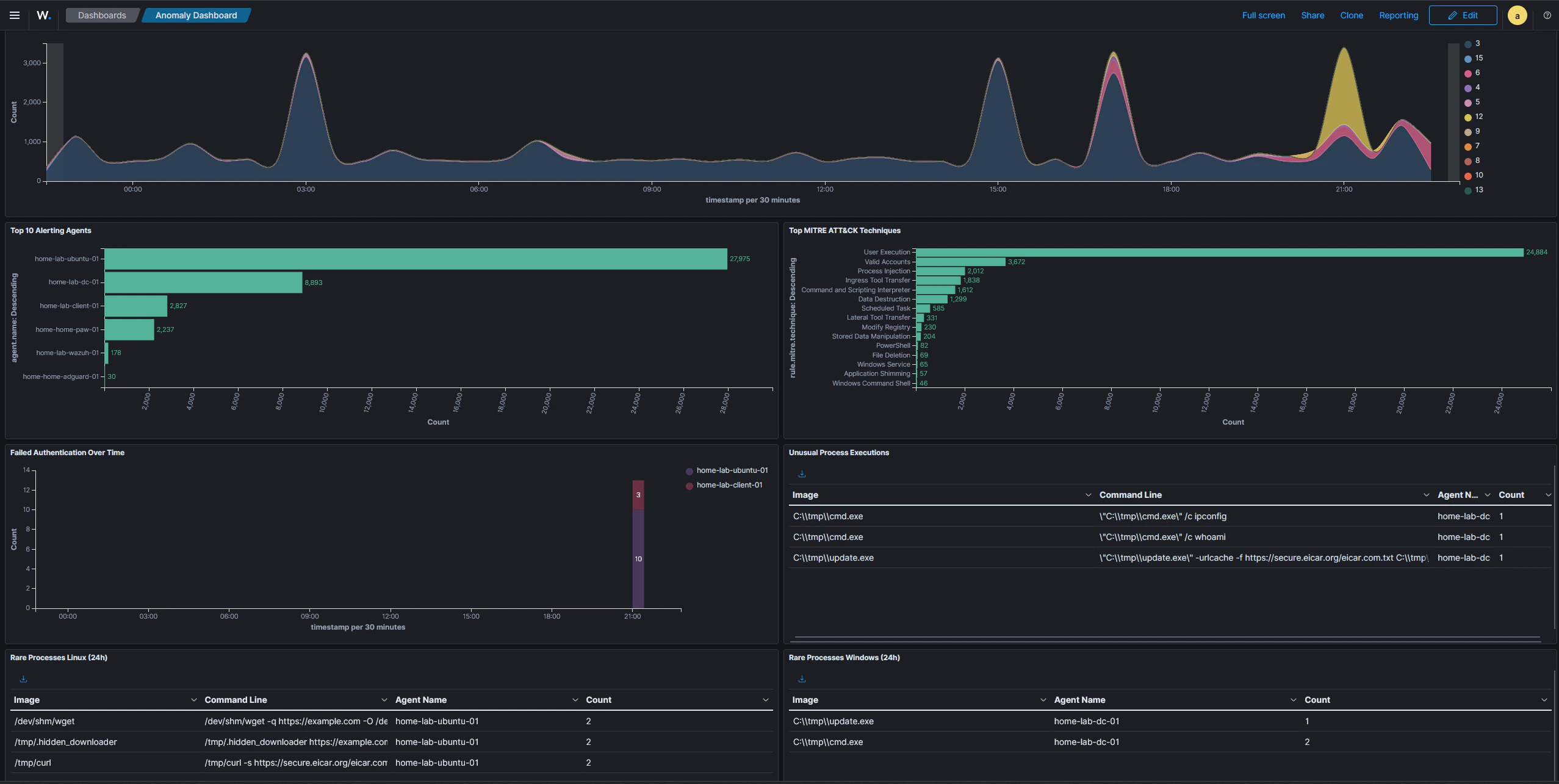
Anomaly Detection Dashboard
This dashboard is designed to surface unusual activity across all monitored systems. Rather than focusing on a specific tool or integration, it provides a broad, environment-wide view intended for daily triage. The dashboard includes the following panels:- Alert severity over time — trends alert levels (low, medium, high, critical) over the selected time window, making it easy to spot spikes in high-severity events that warrant immediate investigation
- Top alerting agents — ranks hosts by alert volume; a sudden jump for a specific host can indicate a compromise, a misconfiguration, or an active attack in progress
- Top MITRE ATT&CK techniques — aggregates all triggered ATT&CK technique IDs across the environment, providing a quick picture of which tactic categories are most active
- Failed authentication over time — tracks authentication failures as a time series, making brute-force attempts and credential stuffing campaigns visible as sustained spikes
- Unusual process executions — lists processes launched from non-standard directories, with exclusion filters suppressing known-good paths such as
C:\Windows\*,C:\Program Files\*, and standard Linux system directories; processes in temp or staging directories are a common indicator of attacker tooling or malware - Rare processes per host — shows the least-frequently seen processes on Windows and Linux systems over the last 24 hours; split into two separate panels because Sysmon uses different field names depending on the operating system
The unusual process and rare process panels apply exclusion filters to suppress known system binaries. This keeps the signal-to-noise ratio low and ensures that only genuinely anomalous executions appear in the results.