Documentation Index
Fetch the complete documentation index at: https://mintlify.com/JagravNaik/bedrock-chat/llms.txt
Use this file to discover all available pages before exploring further.
Prerequisites
Before deploying Bedrock Chat, ensure you have:AWS Account
An AWS account with appropriate permissions to create resources
Bedrock Model Access
Model access enabled in Amazon Bedrock console
Supported Region
Deploy in a region where OpenSearch Serverless is available
CloudShell Access
Ability to open AWS CloudShell in your deployment region
Supported Regions
Deploy Bedrock Chat in a region where OpenSearch Serverless and Ingestion APIs are available if you want to use bots and knowledge bases.
- US: us-east-1, us-east-2, us-west-1, us-west-2
- Asia Pacific: ap-south-1, ap-northeast-1, ap-northeast-2, ap-southeast-1, ap-southeast-2
- Europe: eu-central-1, eu-west-1, eu-west-2, eu-south-2, eu-north-1
- Other: ca-central-1, sa-east-1
bedrock-region parameter, choose a region where Bedrock is available.
Deployment Steps
Enable Bedrock Model Access
In the us-east-1 region, navigate to Bedrock Model Access: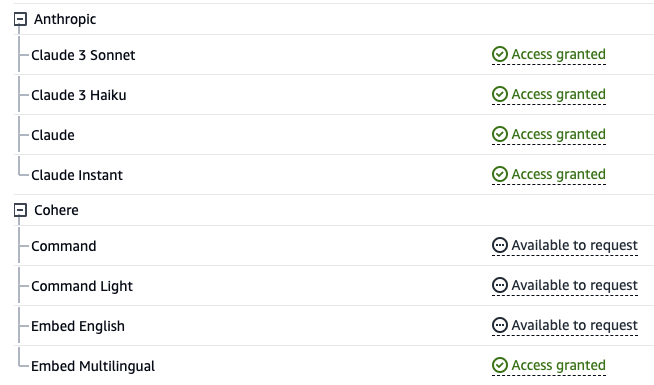
- Click Manage model access
- Check all models you wish to use:
- Claude Models: claude-v4-opus, claude-v3.7-sonnet, claude-v3.5-sonnet, claude-v3.5-haiku
- Amazon Nova: amazon-nova-pro, amazon-nova-lite, amazon-nova-micro
- Llama: llama3-3-70b-instruct, llama3-2-90b-instruct
- Mistral: mistral-large-2, mixtral-8x7b-instruct
- DeepSeek: deepseek-r1
- Click Save changes
Open CloudShell
Open AWS CloudShell in the region where you want to deploy Bedrock Chat.
Run Deployment Script
Execute the following commands in CloudShell:When prompted, confirm you’re ready to deploy v3.x by entering
y.Wait for Deployment
The deployment takes approximately 35 minutes. The script will:
- Create a CloudFormation stack with CodeBuild project
- Start CodeBuild to deploy CDK stacks
- Provision all AWS resources
- Build and deploy the frontend application
You can monitor progress in the CloudFormation console.
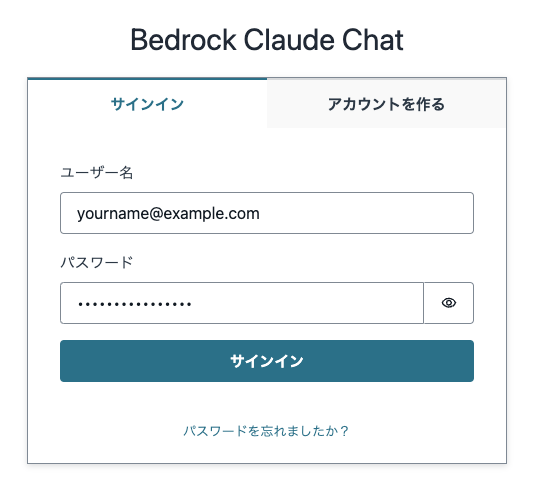
Deployment Parameters
You can customize your deployment with optional parameters:Security Parameters
Disable self-registration (default: enabled). Users must be created via Cognito console.
Comma-separated list of allowed IPv4 CIDR ranges. Default allows all IPv4 addresses.
Comma-separated list of allowed IPv6 CIDR ranges. Default allows all IPv6 addresses.
Disable connections over IPv6 (default: enabled).
Comma-separated list of allowed email domains for sign-up (e.g., “company.com”).
Configuration Parameters
Region where Bedrock is available. See supported regions.
Enable Lambda SnapStart for faster cold starts (default: disabled).
Specific version to deploy (e.g., “v3.0.0”).
Custom repository URL if you’ve forked Bedrock Chat.
Advanced Configuration with CDK Override
Use--cdk-json-override to override any CDK context values:
selfSignUpEnabled- Enable/disable self-registrationenableLambdaSnapStart- Enable Lambda SnapStartallowedIpV4AddressRanges/allowedIpV6AddressRanges- IP restrictionsallowedCountries- ISO-3166 country codes for geo-restrictionsallowedSignUpEmailDomains- Restrict sign-up email domainsbedrockRegion- Bedrock API regionenableRagReplicas- Enable/disable RAG database replicasenableBedrockCrossRegionInference- Enable cross-region inferenceglobalAvailableModels- List of model IDs to enable (empty list enables all)logoPath- Custom logo path underfrontend/public/
Override values merge with existing
cdk.json configuration during deployment. Override values take precedence.Production Deployment Recommendations
Example Production Deployment
Deployment Outputs
After successful deployment, you’ll receive:CloudFront distribution URL for accessing the application
Direct CloudFront domain (without custom domain)
API Gateway endpoint for backend services
Amazon Cognito User Pool ID for user management
Cognito App Client ID for authentication
Troubleshooting
Frontend URL doesn't appear
Frontend URL doesn't appear
If the Frontend URL doesn’t appear or Bedrock Chat doesn’t work:
- Check CloudFormation console for stack errors
- Try deploying a specific stable version:
--version "v3.0.0" - Check CodeBuild logs in CloudWatch
Deployment fails in CloudFormation
Deployment fails in CloudFormation
Common causes:
- Insufficient permissions in your AWS account
- Service quotas exceeded (e.g., VPC, Lambda functions)
- Region doesn’t support OpenSearch Serverless
- Bedrock model access not enabled
Can't sign up after deployment
Can't sign up after deployment
If self-registration is disabled or email domain restrictions are active:
- Go to Amazon Cognito console
- Find your User Pool (ID in CloudFormation outputs)
- Manually create users under “Users” tab
Models not appearing in chat
Models not appearing in chat
Ensure you’ve enabled model access in the Bedrock console:
- Navigate to Amazon Bedrock
- Go to “Model access” in the left sidebar
- Request access for desired models
- Wait for access to be granted (usually instant)
Next Steps
Configure Authentication
Set up external identity providers (Google, OIDC)
Security Settings
Configure WAF rules, IP restrictions, and access controls
Create Custom Bots
Build your first bot with custom knowledge
User Management
Set up user groups and permissions